Security·terminal·MIT
secret-guard
Hides keys in tool output, blocks .env reads and commands that print secrets.
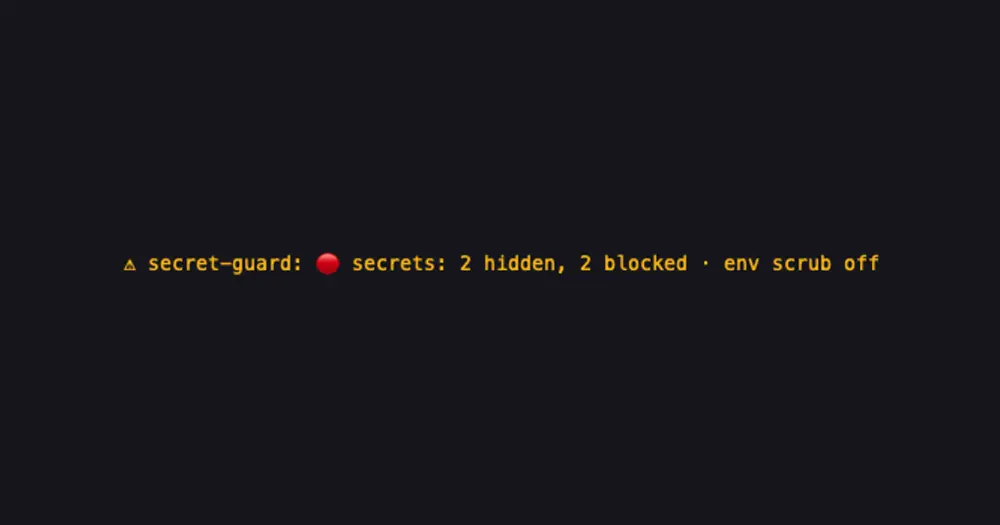
secret-guard keeps API keys and private keys out of what Claude reads and out of the session transcript on disk. It hides known key formats wherever they show up, refuses to open credential files such as .env or ~/.aws/credentials, and refuses commands that print secrets, such as printenv or gh auth token.
The hiding is one-way. Where secret-redactor puts the real value back when a tool needs it, secret-guard leaves a [secret-guard: <rule>] tag in place and refuses any call that would carry a key out.
What it does
- Hides key formats in tool results and in every row added to the session: your messages, the model’s output, attachments, compaction summaries and error results. It knows AWS, GitHub, Slack, Stripe, Google, Anthropic and OpenAI keys, Slack webhooks, private key blocks and JWTs, with patterns derived from gitleaks’ default rules.
- Hides secret values by name. In a line like
DB_PASSWORD=…or"client_secret": "…", a value of 12 characters or more is hidden and the name stays, so Claude knows the setting exists. Values that contain “example”, “dummy” or “placeholder” are left alone. - Blocks credential files for Read, Edit, Write and NotebookEdit:
.envfiles,.envrc,.dev.vars, SSH and GPG private keys,~/.aws/credentials, gcloud, Azure, kube and Docker logins,~/.config/gh/hosts.yml,.npmrc,.pypirc,.netrc, shell history, Terraform state, browser password stores, the macOS keychain, and the login files of Claude Code, Codex and Gemini. That is 41 path patterns in all, and a symlink to one of them is followed and blocked. Templates such as.env.exampleand public keys (*.pub) stay readable. - Blocks commands that print secrets:
printenv, bareenvandexport,security find-generic-password,gh auth token,aws configure get,gcloud auth print-access-token,kubectl get secret,git credential fill,op read,vault read,echo $SOME_TOKEN, a script that prints the whole environment, and any command that names a credential file, such ascat .dev.vars | curl …. - Blocks sending a key out. A command, web request or MCP call whose input holds a known key format is refused.
- Protects hidden values in files. A Write or Edit that would put a
[secret-guard: …]tag into a file is refused, so the real value is never overwritten by its tag. - Shows a status light under the prompt: green when nothing was seen, yellow once something was hidden, red once something was blocked, with the counts.
Install
Needs Claude Code 2.1.287 or later.
claude plugin marketplace add arasovic/claude-code-mods
claude plugin install secret-guard@claude-code-mods
Restart Claude Code. The status light appears under the prompt.
The marketplace name, claude-code-mods, is shared with karanb192/claude-code-mods and other repos. If one of those is already added, remove it with claude plugin marketplace remove claude-code-mods before the add.
The author also recommends env scrubbing, which a mod cannot switch on for you. With it, Claude Code strips its own credentials from the environment of the commands it runs, so there is nothing for a command to print. Add it to the env block of ~/.claude/settings.json:
{
  "env": {
    "CLAUDE_CODE_SUBPROCESS_ENV_SCRUB": "1"
  }
}
Until it is set, the status light ends in env scrub off.
How it works
Three hooks. session.start reads your HOME variable, to expand ~ in paths, and checks whether env scrubbing is on. tool.call checks each call before it runs: the path for the file tools, resolved through any symlink; the command for Bash; and the whole input of every other tool for key formats. After the call runs, it hides keys in the result. session.append rewrites each new row before it is saved, which is why the transcript keeps the hidden form.
So the mod reads every tool input, every tool result and every message in the session. It keeps only the counts for the status light, in memory, and they start over when the mod reloads. It writes no files and makes no network calls. A refused read tells Claude not to look for another way in, and to use a template or ask you to run the step.
For Bash, the command is split on &&, ||, ;, pipes, subshells and backticks, outside quotes, and each part is checked. A heredoc that cat or tee writes out with a quoted delimiter, as in cat > notes.py <<'EOF', is treated as data and its body is skipped. Every other heredoc body is checked as commands.
Limitations
- A script Claude writes and runs (
python -c …,node -e …) can open any file. The mod cannot see what it opens; it only hides known key formats in the output. - Secrets in a format it does not know pass through.
- The command reader is simple, not a full shell parser. A command built to fool it, with an odd heredoc delimiter, nested escaped backticks or a function that redefines
cat, gets through. Output hiding still applies. - It can block harmless work: a
.envnamed in a heredoc that runs as code, or a quotedenvorexportin such a body, is refused. - Commands that touch a credential file without printing it still run:
ls,stat,test,touch,chmod,chown,rm.cpandmvrun when the credential file is the target, as incp .env.example .env, not when it is the source. - A test token in source code is hidden from Claude too. Claude can edit the other lines of that file but not that one, so it will ask you to change it.
- The screen can show a row for a moment before it is rewritten. Claude and the transcript only get the hidden form.
- The author documents the status light only in the terminal.
Similar Claude Mods
wp-credential-guard
Masks WordPress logins for the model and puts the real values back into Bash commands.
env
Claude manages your .env keys and asks you for values it never gets to see.
pii-guard
Reversible Taiwanese PII redaction for tool results, prompts and writes, all on loopback.
toolgate
Asks TypeSafe's Jev seven risk questions per tool call, then allows, asks or denies.
Popular Claude Mods
The whole directory →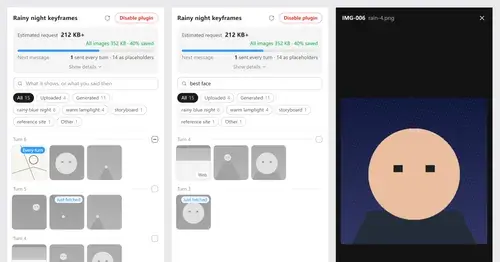
Context Attachment Manager
Pick which past images go out with your next message; the rest become placeholders.
pin-memo
Notes and clickable todos pinned above the prompt, back when you resume the session.
prismantis
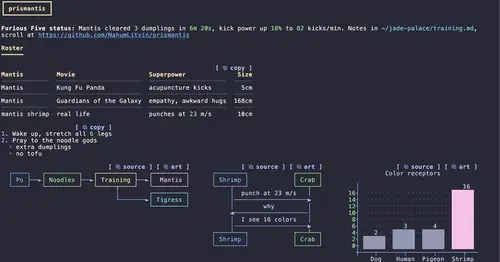
Claude's replies in 15 themes: colored tables, highlighted code, diagrams and charts.
multi-core
ChatGPT, Cursor, Zen, Antigravity and Grok models in one Claude Code session, via /model.