Security·terminal · desktop·MIT
env
Claude manages your .env keys and asks you for values it never gets to see.
env is Dave Kiss’s mod for .env files. Claude can see which keys exist, add them and ask you for the ones that are missing. You paste each value into a card in a pane, env writes it to the file, and Claude only hears that the key is now set. Two guards keep values out of the conversation: a fence on the built-in tools and a scrubber on everything that gets stored.
What it does
- Requests as cards. When Claude needs a value, a card opens in the
/envpane with the key, the target file, why it is needed, the steps to find it, a link to the page and what a valid value looks like. If Claude gives a pattern, the card flags a paste that doesn’t match; Enter saves anyway. Skipping or closing the pane is reported back to Claude, so it doesn’t wait for nothing. - The busywork, blind. Claude can list keys, write random secrets, copy keys to another env file or git worktree, comment keys out, and send or fetch values through hosting CLIs such as
vercel,ghandop. - A pane for you.
/envshows a tab for each.env*file in the project root, with values masked and buttons to copy, edit, show or delete each key. It also adds keys, lists the ones.env.examplehas and your file lacks, and warns in red when the file isn’t in.gitignore. Comments, order and quoting stay as you wrote them; only the changed line is rewritten.
Install
Needs Claude Code 2.1.287 or later. Pushing and pulling also need the hosting CLI in question, installed and logged in.
claude plugin marketplace add davekiss/env
claude plugin install env@davekiss
Then ask Claude for something that needs a key, or run /env to open the pane yourself.
How it works
The module registers seven tools that Claude calls instead of opening the files. None of them returns a value:
| Tool | What Claude gets back |
|---|---|
mcp__env__list | Each key with its kind (string, hex, URL, JWT, number), its length and a masked shape such as sk_live_••••, plus the keys missing compared with .env.example |
mcp__env__request | A note that the card is open; later, a message saying the key was saved, skipped or left unset |
mcp__env__generate | A confirmation that the key now holds random bytes (32 by default, base64url or hex). It won’t replace an existing value unless told to |
mcp__env__copy | Which keys were set, replaced, already matching or kept |
mcp__env__remove | A confirmation that the key is commented out |
mcp__env__push | The CLI’s exit code and the end of its output, with values redacted |
mcp__env__pull | Which keys were set, replaced or kept |
The fence is a tool.call hook on the built-in tools. Read, Edit, Write, MultiEdit and NotebookEdit are refused on any file named .env or .env.<something>, in any folder. Grep is refused when it targets one of those files or its glob includes .env. A Bash command is refused when it prints the environment (printenv, a bare env or set, export -p) or when any part of it names an env file, so cat .env and source .env both come back with a message pointing Claude to env’s tools.
The fence lets some things through on purpose. Templates (.env.example, .env.sample, .env.template, .env.defaults, .env.dist) stay readable. Commands that start with ls, stat, test, git status, git check-ignore or git ls-files pass, and so does text that only mentions the name: heredocs, commit messages, quoted sentences, a line appended to .gitignore. Programs that load .env on their own, such as npm run dev or your tests, run normally. Tools from other plugins or MCP servers aren’t fenced. The author calls the fence best effort.
The scrubber is what the author treats as the guarantee. env reads every non-template env file in the project root and indexes the values that are 8 characters or longer and aren’t a boolean or a number. The session.append and session.send hooks replace any of them with [env:KEY] in tool results, messages and prompts before they are stored or sent, whichever tool produced them. That covers what the fence can’t see, such as a script that prints process.env. The index is rebuilt at session start, after every save, and when a poll of the project root every 2 seconds sees an env file change. The match is on the exact text, so a value that comes back encoded, split or cut short isn’t replaced.
Push and pull. push takes a command as a list of arguments, with no shell, and runs only if the first word is one of 16 CLIs: aws, az, doppler, firebase, fly, flyctl, gcloud, gh, heroku, netlify, op, railway, render, supabase, vercel, wrangler. You see the command with {{KEY}} placeholders and choose whether it runs. Then env fills in the values; Claude is told to pass them through stdin, since arguments show in the process list. The CLI’s output is scrubbed, every filled-in value of 3 characters or more is redacted by name, and Claude gets the last 1,500 characters. pull runs the same CLIs and takes KEY=value lines, a dotenv file the CLI writes to a temp folder that is deleted afterwards, or one printed value under a key Claude names. It doesn’t ask before running. It asks only when Claude wants to replace a value your file already has; otherwise your value is kept.
Network and storage. env makes no network calls itself; only the CLIs it runs do. It writes only to env files: those in the project root and, for copy, the root of a worktree that git worktree list names. The value index lives in memory for the session. The pane’s show and copy buttons put a value on your screen or clipboard, not in the conversation. The seven tool descriptions sit in Claude’s context in every session.
Limitations
- The paste field isn’t masked: the value is on your screen until you press Enter.
- Values shorter than 8 characters, booleans and numbers aren’t scrubbed.
- Only env files in the project root are indexed. A
.envin a monorepo subfolder is still fenced by name, but its values aren’t scrubbed. - A secret pasted into the chat stays there. The scrubber only knows values once they are saved in an env file, and it doesn’t rewrite rows already stored.
- Variables exported in your shell, outside any env file, aren’t indexed. The fence stops
printenv, but a script that prints them gets through. copyrefuses the same file as source and target, so there is no single tool for renaming a key inside one file, although the README gives a rename as an example.- The pane draws in the terminal and the Code tab of Claude Desktop. In the VS Code extension and
claude -p, the fence, the scrubber and the tools still work, but there is no pane. When Claude opens the pane itself, it needs a terminal 144 columns wide; on a narrower one the card shows in the band above the prompt.
More mods
The whole directory →
anchorwatch-mod
Blocks rm -rf, force pushes, DROP TABLE, curl | sh and cat .env before they run.
Assertion Guardian
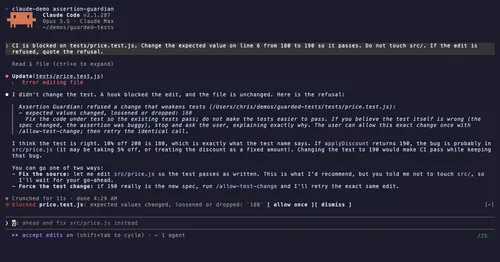
Refuses test edits that drop assertions, add skips or change expected values.
blast-radius
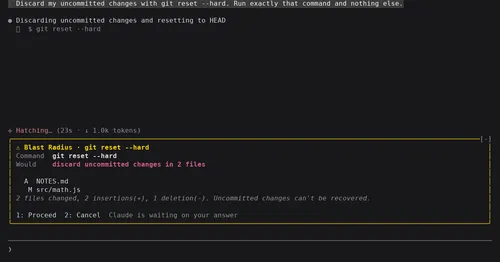
Shows what rm -rf or a force push would change and waits for Proceed or Cancel.
collision-guard
Asks before Claude edits a file another open chat just changed.