Interface·terminal·MIT
cc-side
A throwaway second chat in the right pane, forked from your main conversation.
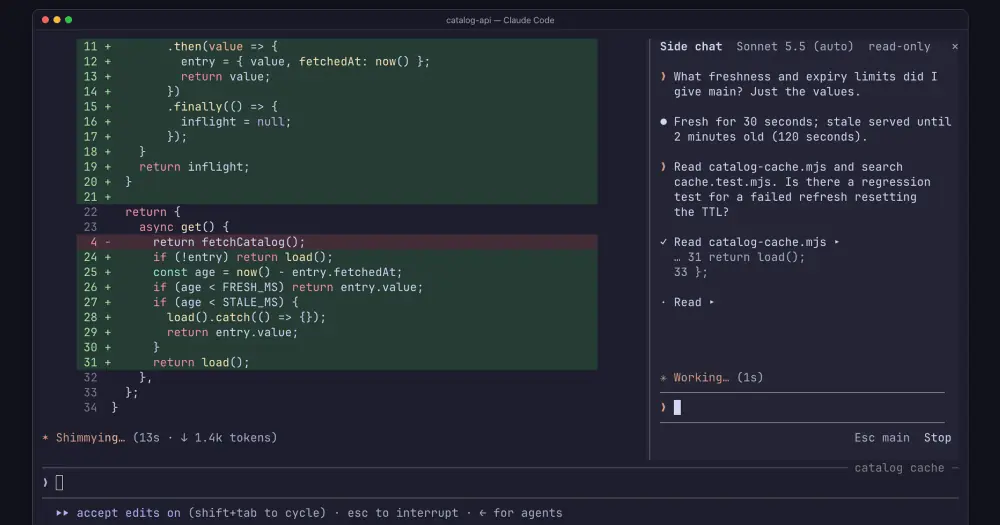
cc-side opens a second conversation with Claude in a pane on the right of Claude Code. It starts from a snapshot of your main chat, so you can ask a quick question, dig into some code or try an idea while Claude keeps working on the main task, and none of it lands in the main conversation. Closing the pane throws the side chat away.
What it does
- Forks from the main chat. The side chat gets the main conversation so far, the same project folder, the same model and the effort of main’s last turn. When main moves on, a line under the input says how many replies it is ahead, and
/refreshforks again from main’s latest point while keeping your side conversation. After a refresh, Claude remembers what you discussed on the side but not the files or output it read before. - Behaves like a normal chat. Enter sends and Shift+Enter adds a line.
/lists commands, and Claude Code’s own commands and your skills work there.@completes file and folder paths in git projects. Claude reads files and runs tools on the side too; click a tool call to see its input and output. Esc returns to the main chat. - Starts read-only.
/edit onlets Claude edit files from the side chat and/edit offstops it; new side chats remember your last choice. Approvals appear inside the pane, edits as diffs. Read-only only blocks file edits: shell commands follow your usual approval rules, so one you have already allowed can still change files. - Hands results back.
/insertputs the side chat’s last reply into the main prompt without sending it, and/copycopies it./modeland/effortchange the side chat only./stopinterrupts a reply. - Opens and asks in one step.
/side <question>opens the pane and sends the question. If the side chat is busy, the question goes back to your main prompt instead.
The pane takes 44% of the terminal width, at least 45 columns. aside is another side-chat mod on this site.
Install
Needs Claude Code 2.1.287 or later, plus Node.js 18 or later (or Bun) and a terminal at least 110 columns wide. The author says it works on macOS, Linux and Windows.
claude plugin marketplace add Ahmad8864/cc-side
claude plugin install cc-side@cc-side
The marketplace entry installs the 0.4.0 release archive, pinned by a SHA-256 checksum. Switch Claude Code to the fullscreen view once with /tui fullscreen, then run /side. /close, /side close or the × closes it.
How it works
The side chat does not run inside your main session. On /side, the hook module looks for Node.js 18 or later, then Bun, on your PATH and starts the plugin’s bundled helper with process.run. It hands the helper the main session’s id, the project folder, the model, the effort, the edit setting, and the permissions and sandbox blocks of your settings. The helper answers with an address, a process id and a bearer token, and keeps running in the background.
Every http.fetch call in the module goes to that address with that token, to nothing else. The pane polls the helper’s state every 120 ms while Claude is replying and every 700 ms otherwise, and posts your messages, approvals, edit toggles and stops to it. The helper’s own code is not part of the hooks module, so the code we reviewed does not show whether it drives a second claude process or calls the API itself, which address it listens on, or what it keeps on disk while it runs. The module passes it no API key or token of yours.
Side replies are real model requests, so they count toward your usage like the main chat’s. The author says opening the pane costs nothing and that the side chat reuses the main chat’s prompt cache when both use the same model and effort. An unlisted /side stats prints the side chat’s request count and the cache tokens it read and wrote.
Its other process.run calls are the runtime version check and git ls-files, at most every 10 seconds while you type an @ mention. It reads the main transcript with session.messages only to check whether it is empty, and for /side stats when tracing is on. prompt.fill puts text in the main prompt only for /insert, or to return a /side <question> that could not be sent when the prompt is empty. Nothing is ever submitted to the main chat for you.
On your machine, the module stores one value in the plugin’s store: whether the last side chat could edit files. It writes a file only if you set CC_SIDE_TRACE to a path, as a debug log that records the side conversation.
Closing the pane tells the helper to close and clears the pane’s messages, draft and approvals. /clear and the end of the session close it too. What the helper does with its copy of the conversation at that point is not in the reviewed code. Files Claude changed from the side chat stay changed, because both chats share your project folder.
Limitations
- The pane draws only in the terminal’s fullscreen view.
/siderefuses to open in the classic view or in a window narrower than 110 columns. - Pasting goes to the main chat, because Claude Code does not let plugins handle pastes yet.
- Files you mention with
@are not listed under your message as in the main chat, though Claude still sees them. - Settings are copied when the side chat opens, so permissions allowed only for this session, command-line tool limits and later mode changes may not carry over.
- A long side chat shows only its newest messages that fit the pane, with a line counting the hidden ones.
- The author calls it early: mostly used on macOS, tested with Claude Code 2.1.287, and little tested with very long chats, attachments or less common terminals. The events and methods it relies on can change between Claude Code versions.
Similar Claude Mods

cc-changelog
The unofficial Claude Code changelog in a pane, plus fifteen tools the model can call.
cc-stretch
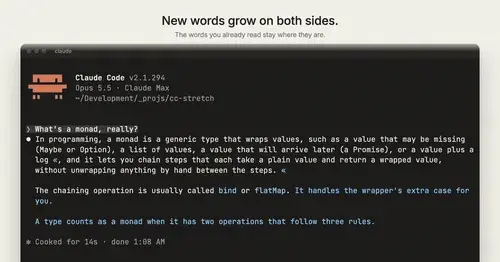
Replies arrive short; click a phrase and it grows in place, click « to fold it back.
terminal-browser
A Chromium browser in a pane beside the transcript, for previews and agent browsing.
replay-theater
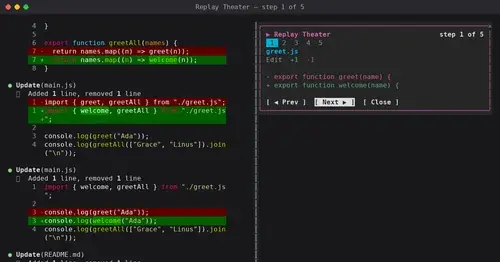
A /replay pane that walks through the last turn's file edits, one diff per step.
Popular Claude Mods
The whole directory →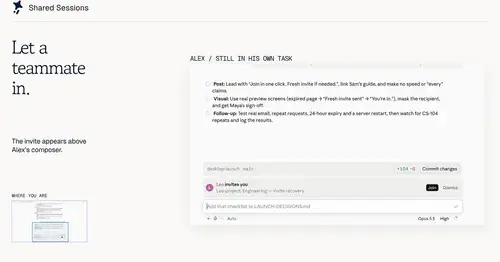
shared-session
Share a session by link: teammates join from their Claude Code and prompt it live.
claude-latex
TeX math, TikZ diagrams and LaTeX blocks typeset in Claude's replies, in the desktop app.
inbox
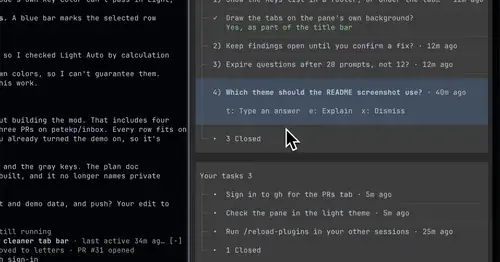
Claude's questions, your tasks, its findings and your PRs, sorted in one pane.
env
Claude manages your .env keys and asks you for values it never gets to see.