Automation·terminal·MIT
fixkit
Long press a UI bug in your iOS app in the simulator and Claude Code gets the report.
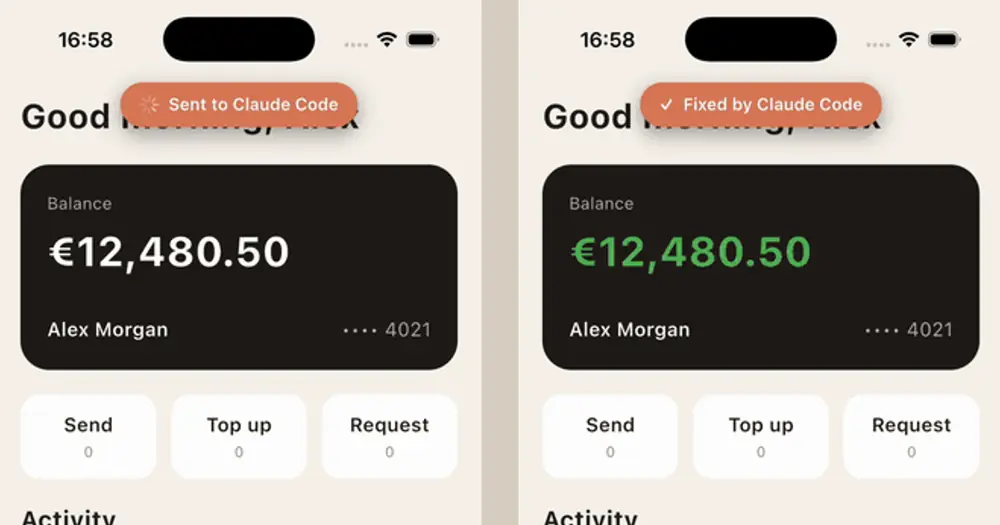
fixkit lets you report a UI bug from inside your iOS app while it runs in the simulator: long press the element, type what is wrong and press Return. The report reaches your Claude Code session as a prompt, with the pressed element, where it sits in your code and a screenshot, and a pane follows it until the fix is on screen. It works with SwiftUI, UIKit, React Native and Flutter apps, in debug builds only.
What it does
- Reports point at code. In SwiftUI, React Native and Flutter a report names the component around the pressed element, the file and line where it is written and where that component is used. In UIKit it names the property that holds the view, such as
ProfileViewController.nameLabel. Nothing in your views has to be marked;.fixable("name")is optional. - A pane tracks each fix. The Fix queue pane lists every report with its status (queued, fixing, rebuilding, live), elapsed seconds, your comment, the element, its source line and the files Claude edited. It opens by itself in terminals 144 columns or wider, or with
/fix-queue. Banners in the app show the same status. - Live means on screen. The app tells the receiver each time it launches, so a fix counts as live whatever rebuilt it: XcodeBuildMCP,
xcodebuild, Xcode’s Run button, Fast Refresh or a Flutter hot reload. A turn that ends without a relaunch is marked not rebuilt, or not applied in React Native and Flutter. - Flutter gets a reload tool. Saving a file does not reload an app started with
flutter run, so in a Flutter project the mod gives Claude ahot_reloadtool. Compile errors come back to Claude, and it can ask for a hot restart when a hot reload does not apply the change.
Install
Needs Claude Code 2.1.287 or later, plus macOS with an iOS 17 or later simulator and Node.js 18.2 or later. FixKit works only in the simulator.
claude plugin marketplace add ostiums/fixkit
claude plugin install fixkit@fixkit
The mod is the half that lives in Claude Code. Your app needs the FixKit library too, which release builds leave out:
- SwiftUI or UIKit (Xcode 16.3 or later): add the Swift package
https://github.com/ostiums/fixkitwith the rule Branch: main. Afterimport FixKit, call.fixKitHost()on the root view insideWindowGroup, orwindow.fixKitHost()afterwindow.makeKeyAndVisible(). - React Native (0.80 or later with the New Architecture; Expo Go and development builds work): install the npm package and wrap your root component in
<FixKitHost>. - Flutter (3.35 or later): add the git dependency to
pubspec.yamland start the app withrunApp(const FixKitHost(child: MyApp())).
npm install --save-dev fixkitdependencies:
fixkit:
git:
url: https://github.com/ostiums/fixkit.git
path: flutterAdd .fixkit/ to .gitignore, because reports and screenshots are saved there. To let Claude open the screenshots without asking each time, allow the folder in .claude/settings.json:
{ "permissions": { "allow": ["Read(./.fixkit/**)"] } }Start claude in the project’s root (for React Native, the folder with package.json; for Flutter, the one with pubspec.yaml), run a debug build in the simulator, long press an element, type what is wrong and press Return.
The author recommends two extras. AXe names the pressed element; without it a report carries only the screenshot and the touch point. XcodeBuildMCP rebuilds and relaunches the app in one call. If XcodeBuildMCP runs through npx, FixKit uses the AXe bundled with it; otherwise install AXe with Homebrew:
brew install cameroncooke/axe/axeTo try it without your own app, the repo’s Tally/ folder holds a SwiftUI wallet with four seeded UI bugs; ./scripts/reset-demo.sh restores them, builds and launches it.
How it works
At session start the mod reads package.json and pubspec.yaml in the project root to tell a native, React Native or Flutter app apart, registers /fix-queue and, in a Flutter project, the hot_reload tool. It then spawns a local receiver, node server/receiver.mjs from the plugin’s folder, which listens on 127.0.0.1:4747. Only one session listens at a time: the newest one takes the port.
The app posts each report to the receiver. The receiver uses AXe to find the deepest element under your finger and saves the screenshot and the accessibility tree to .fixkit/reports/ in your project. The mod keeps the last 50 reports for the pane and writes their statuses to .fixkit/status.json, which the receiver hands to the app for its banners. The mod’s only network call is the hot_reload tool’s request to the receiver on 127.0.0.1, which passes it to the VM service that flutter run serves.
Each report is submitted as a prompt in your name, after any turn already running, so every fix uses your Claude Code usage like a prompt you typed. The mod also adds a section of instructions for fix requests to the session’s system prompt, which goes with every turn.
It hooks every tool call, but only acts in the main agent while a report’s turn runs. It reads the tool’s name, to mark the report rebuilding during a build-and-run call, and the file path of Edit and Write calls, to list the edited files in the pane. It does not read commands or file contents.
Limitations
- iOS simulator only: no physical devices and no Android.
- If the receiver stops, the pane says so;
/reload-pluginsstarts it again. - SwiftUI: in Debug builds FixKit passes each view’s file and line through
ViewBuilder.buildExpression, so a builder that must return one concrete type, such as@ViewBuilder var label: Text, stops compiling. Returnsome Viewthere, or depend on FixKit withtraits: []to turn source lines off. The feature relies on the underscored SwiftUI API that Previews use, and a body with an explicitreturnis named where it is used. - React Native: boot one simulator per iOS version, or reports arrive without a screenshot. Native
Modals, natively presented screens and a nested<FixKitHost>are not covered, and lines can be a few off after Fast Refresh until the next reload. - Flutter: a widget built in a helper method points into that method, not at its caller.
- The pane is documented in the terminal only.
Similar Claude Mods
After
Queue tasks for after the current one, without steering Claude mid-turn.
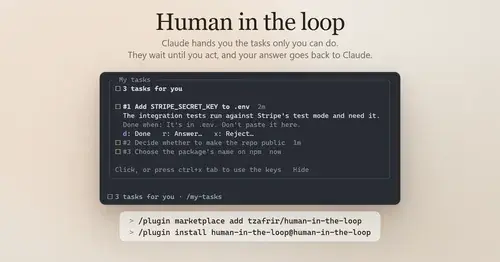
Human in the loop
Claude assigns you what only you can do. Tasks wait in a pane until you answer.

threads
Spin up Claude sessions on other models, watch them in a pane, get their answers back.

hope
Judges each turn's edits for slop; accept, edit or reject every finding.
Popular Claude Mods
The whole directory →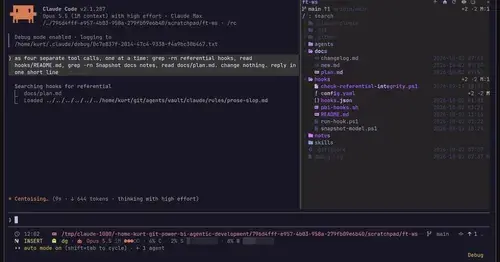
filetree
Sidebar file tree with git status that lights up what Claude reads, edits and commits.
multi-core
ChatGPT, Cursor, Zen, Antigravity and Grok models in one Claude Code session, via /model.
paste-view
Previews of pasted text and thumbnails of pasted images, drawn above the prompt.

kindex-modern
Task tools backed by a Kindex store in your repo, plus repo memory on every prompt.