Dashboards·desktop·MIT
desktop-statusline
Git state, cost, context and plan limits above the prompt in Claude Desktop's Code tab.
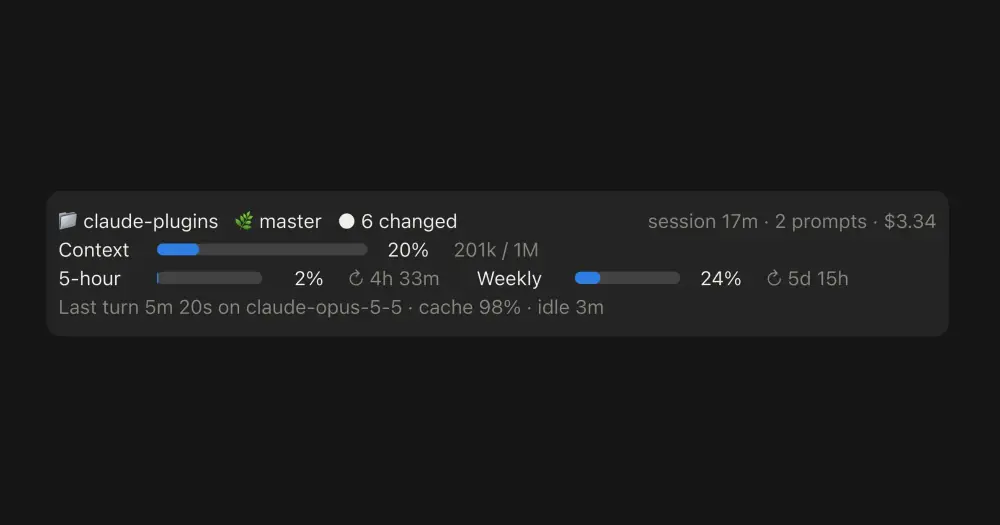
desktop-statusline draws a status band above the prompt in the Code tab of the Claude Desktop app, where the CLI statusLine script never runs. It shows your git state, what the session has cost, how full the context is and how close you are to the 5-hour and weekly plan limits. In a terminal it draws nothing, so a CLI status line you already use stays as it is.
If you already have a statusLine script and want that exact line in Desktop, statusline-anywhere runs it there; desktop-statusline draws its own band and needs no script.
What it does
The band takes four lines, five on a narrow window, where the two limit meters stack.
- Where you are. Folder, branch, a marker when the session runs in a worktree, commits ahead of or behind upstream and the number of uncommitted files. On the right: session age, prompts sent and session cost.
- Context. A meter with tokens used against the window size. If you set an auto-compact window smaller than the model’s (
/autocompact,autoCompactWindoworCLAUDE_CODE_AUTO_COMPACT_WINDOW), it measures against that, as/contextdoes. - Plan limits. The 5-hour and weekly meters, each with a countdown to its reset. They appear when Claude Code reports plan limits for your account.
- Last turn. Duration, model and cache hit rate, any server-side tools the API ran in the main conversation (web search, advisor), how long the session has been idle, and how many times it has compacted, with the token count before and after the last compaction.
- Agents and workflows. Up to three rows for subagents still out (running, queued, held, or teammates idle between turns), then a
+N moreline. Each workflow run gets one row with its active, done and failed counts.
Meters turn amber at 80% and red at 95%. A cache hit rate under 50% shows as a warning, and so does idle time past the prompt-cache TTL, marked (cache cold). When a plan limit crosses 80% and again at 95%, once per limit window, the mod sends a system notification, or a toast where no notification channel delivers it. In the desktop app the author says to expect the toast.
Install
Needs Claude Code 2.1.287 or later and the Claude Desktop app. The app ships its own copy of Claude Code, so keep it updated too.
claude plugin marketplace add centminmod/claude-plugins
claude plugin install desktop-statusline@centminmod
Run these in your shell: the desktop app does not accept /plugin commands. Then start a new session in the app’s Code tab. The band appears once the session has data, usually right away.
Claude Code asks for one setting when you enable the plugin, cache_ttl: how long the session can sit idle before the band marks the cache cold. Enter 1h (the default, right for a Claude subscription within plan usage) or 5m (an API key, a cloud provider, or a subscription drawing on usage credits). Any other value counts as 1h. If you set promptCacheTtl or CLAUDE_CODE_PROMPT_CACHE_TTL, match it. You can change it later in /plugin or /config.
How it works
The only program it starts is git, with two fixed, read-only commands in the session’s folder and a 5-second timeout: git status --porcelain=v2 --branch for the branch, upstream and changed files, and git rev-parse --git-dir --git-common-dir to tell a worktree from the main checkout. Neither contacts a remote, and both run only in desktop sessions. Outside a git repository the first line shows just the folder.
Through the mods API it reads the session’s usage (context, cost and plan limits, from Claude Code’s local /context estimate, with no API call), the folder, the prompt count and the start time. From subagents it reads the type, state and short task description; from workflow agents, the run and agent IDs and whether each answer ended normally, never the prompt or answer text. It also reads each finished turn’s duration, model and token counts, the names of server-side tools, and the token counts around a compaction. The author states it reads no prompt or response text, files, environment variables or credentials.
Its hooks change nothing. tool.call fires only for the Agent tool and agent.spawn for new subagents; both schedule a refresh two seconds later and pass the call through. Otherwise the band refreshes at session start, when the desktop app attaches, after every turn and subagent answer, when a plan limit’s percentage changes, and every 60 seconds.
It makes no network calls, calls no model, so it spends none of your usage, and writes no files. Its values live in the session’s state and end with the session.
Limitations
- Draws only in the desktop Code tab: nothing in a terminal, the VS Code extension,
claude -por cloud sessions. - No lines added or removed: the mods API does not expose them, so the band counts uncommitted files instead.
- The cache-cold warning follows your
cache_ttl, not your account. A subscription that starts drawing on usage credits drops to the 5-minute TTL, and the band keeps using the setting. - No effort level or permission mode: the desktop app’s footer already shows both.
- A subagent that has not answered after an hour stops counting as active.
Similar Claude Mods

starfleet-panel
Model, context, rate limits and git branch as an LCARS console under the prompt.
Flightdeck
Subagents, permission checks, advisor consults, context and cost, live in a pane.
todos
The repo's TODOs and FIXMEs above the prompt at session start, newest first.
savvy-progress
Running, finished and planned subagents with model, context, cost and time, in one panel.
Popular Claude Mods
The whole directory →cache-keeper
Prompt-cache timer, keep-warm pings, cold-send guard, a board of chats and a handoff.
cc-stretch
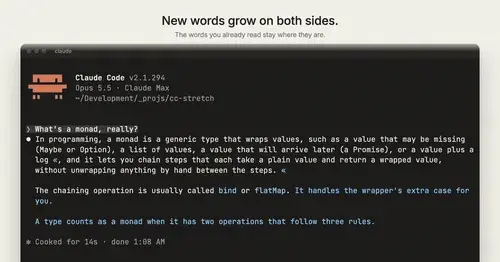
Replies arrive short; click a phrase and it grows in place, click « to fold it back.
secret-redactor
Swaps secrets, emails and IPs for placeholders before the model sees them.
fast-jev-compaction
Compaction that drops stale tool calls instead of summarizing; the rest stays verbatim.