Dashboards·terminal · desktop · mobile·MIT
Flightdeck
Subagents, permission checks, advisor consults, context and cost, live in a pane.
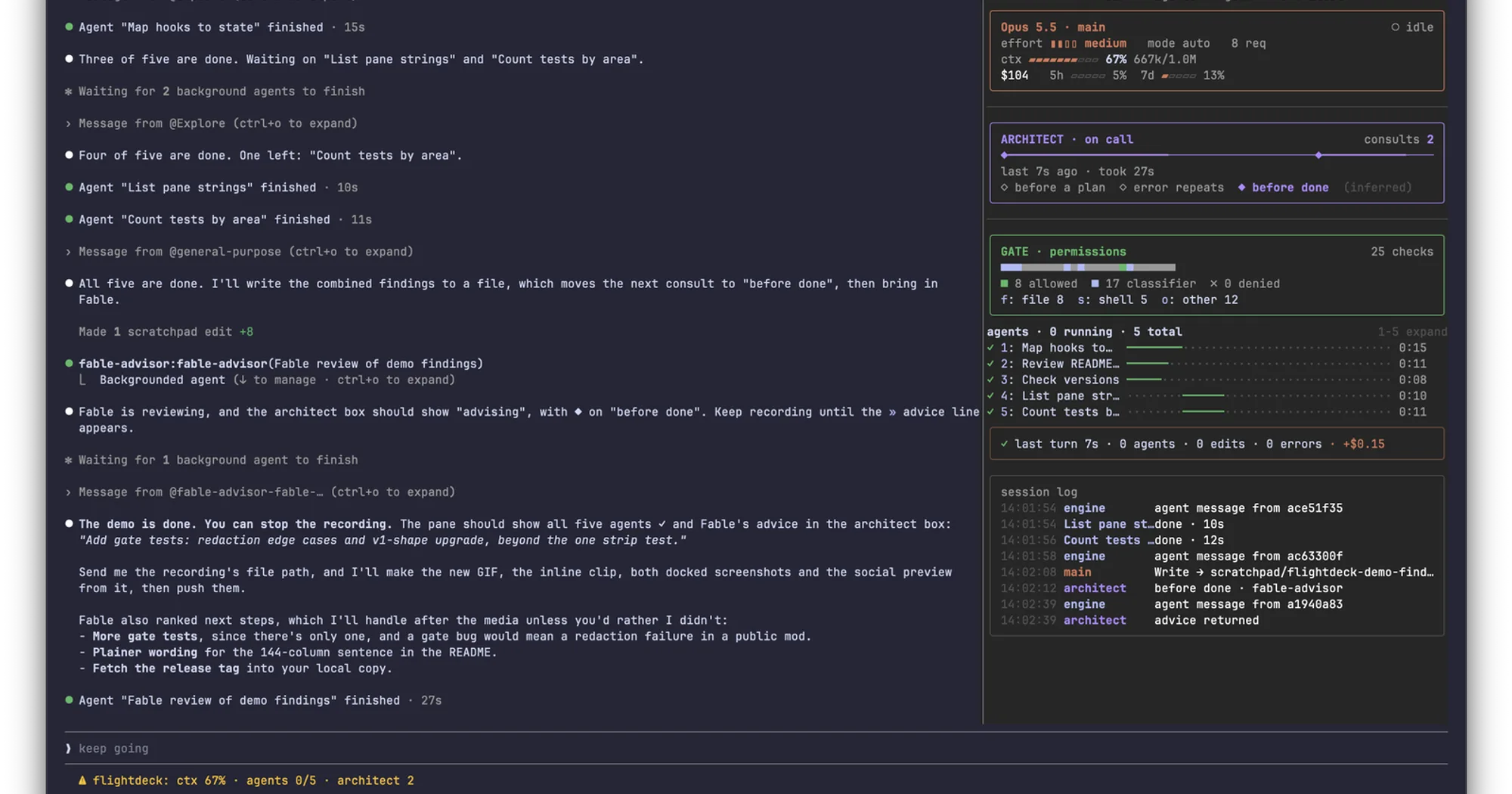
Flightdeck is a live pane that shows what your session’s agents are doing: the main model’s context and cost, every permission check, each subagent as a card or a swimlane, and every consult with an advisor or architect agent. Every number comes from the session’s own events, and the mod calls no model and makes no network requests, so it costs no tokens.
What it does
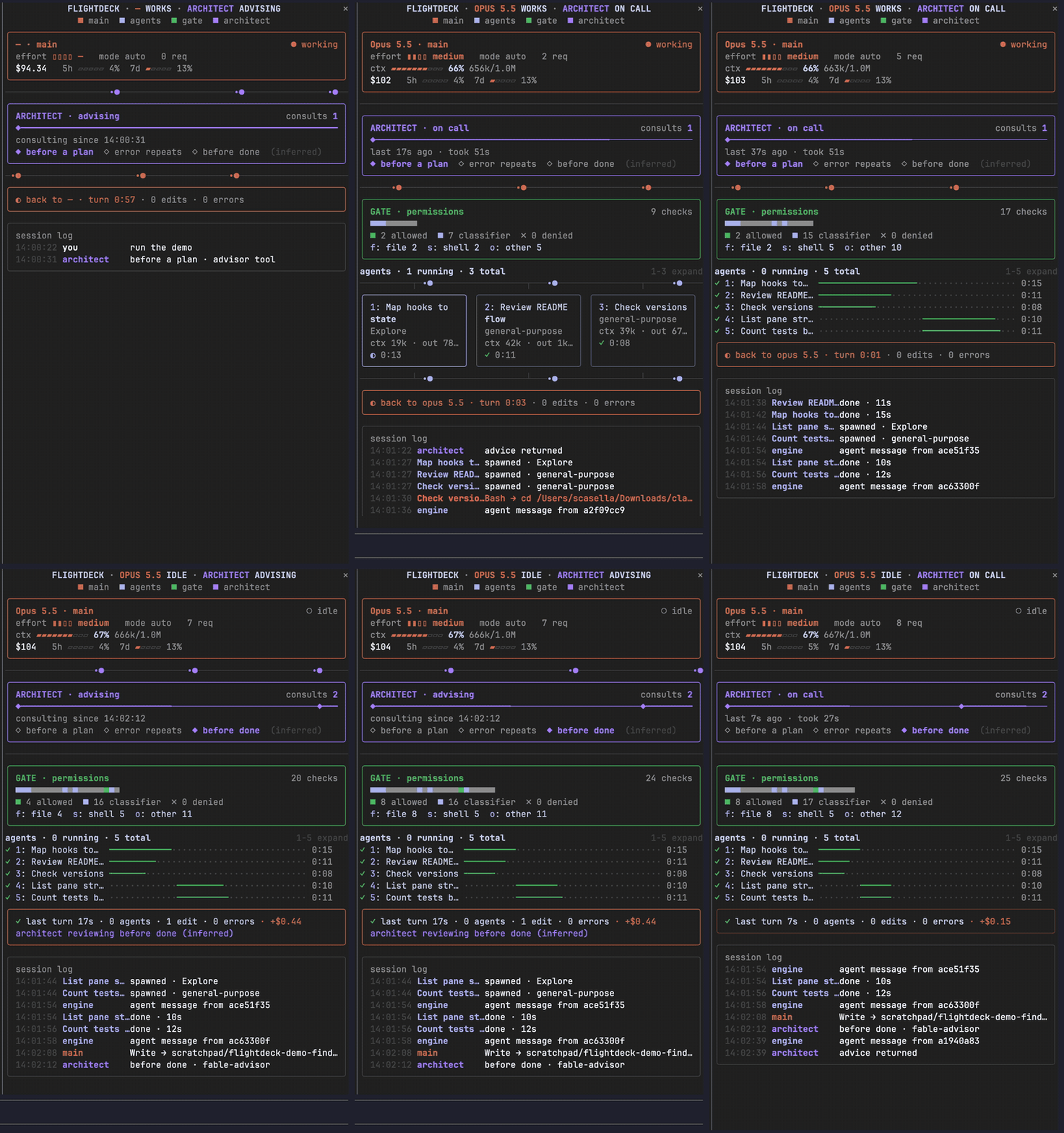
The pane stacks up to seven panels. Panels with nothing to show take no room, so a session without subagents gets just the main box and the log.
- Main. Model, effort, permission mode and request count; a context gauge with the number of compactions; the session cost and the first two rate-limit windows, when your plan reports them.
- Architect. Tracks consults with a reviewer: any subagent whose type matches
advisor|architect(a regex you can change), or a matching server-side tool such as Claude Code’sadvisor. It draws the consults on a timeline and shows whether one is running, how long the last one took and, for a subagent architect, the first line of its advice. - Gate. One coloured cell per permission check: allowed by a rule, decided by the auto-mode classifier or by you and then run, still pending, or denied. Checks made inside a subagent are dimmed. Totals per family (file, shell, other) open a drill-down with the last five checks and their verdicts.
- Agents. Subagents as cards side by side, three by default: the task, type, live context and output tokens, steps, a running clock, and
max_tokensin red when a request hits it. More agents than fit switch to swimlanes on one time axis. - Loops. Model loops that belong to no card, such as workflow agents, compactions and memory forks.
- Receipt. The running turn, or the last one: duration, agents spawned, edits, errors and the cost it added.
- Log. Prompts, spawns, completions, consults, edits, errors and denials. While you view one subagent’s transcript, the log shows only that agent.
Connectors between the panels animate only while work is running. The mod also adds a status line entry with the context, running agents, consults and denials.
In a fullscreen terminal the pane docks beside the transcript, in two columns from 110 columns wide. On the terminal’s main screen it sits above the prompt as a summary of at most 8 rows, with up to three agents:

cctop covers similar ground with more on rate limits and tool latency, plus a companion binary. Flightdeck puts subagents, permission checks and advisor consults first, and needs nothing outside the plugin.
Commands and keys:
/flightdeckopens the pane,/flightdeck closecloses it, and/flightdeck layout auto|compact|wide|minioverrides the layout for the session./flightdeck resetclears agents, checks, consults, the log and the turn; cost, rate limits and compactions stay./clearresets the pane too.ctrl+x tabfocuses the pane. Then a digit expands an agent’s card or lane (full task, last three tool calls, start of its answer), andf,soroopens the gate drill-down for file, shell or other tools.
Options live in /config, or under pluginConfigs["flightdeck"].options in settings.json. The useful ones: panels to hide or reorder panels, maxCards (1 to 6) for cards before swimlanes, architectPattern for what counts as the architect, motion: off for still connectors, palette: pastel if the theme colours read badly, and statusLine and openOnStart to turn those off.
Install
Needs Claude Code 2.1.287 or later.
claude plugin marketplace add scasella/claude-flightdeck
claude plugin install flightdeck@claude-flightdeck
Run /reload-plugins, then /flightdeck. The installer may say config options are not set; the defaults work. From then on the pane opens by itself when a session starts in a terminal at least 144 columns wide; below that width, /flightdeck opens it.
How it works
Flightdeck only watches. Each of its 15 hooks passes its event on unchanged, so it never denies, rewrites or delays a tool call, a prompt or a subagent.
To fill the panels it sees every tool call’s name and input, every permission verdict, subagent spawns with their token usage and final answers, the first 70 characters of each prompt, and the context, cost and rate-limit readings. It spots server-side advisor calls in the assistant’s messages, where their content is encrypted.
What it keeps are short summaries in session state, such as a tool name with a path or command. Credentials (bearer tokens, API keys, KEY= variables, passwords in URLs) are masked before anything is stored. According to the README it makes no network requests, runs no processes, reads and writes no files, calls no model and keeps nothing across sessions. The hooks module bears this out: the only engine methods it calls are the clock, session usage, command registration and the pane and status line.
Limitations
- Some labels are inferred, not measured. The moment of each consult (before a plan, after repeated errors, before done) is guessed from the turn’s edits and errors and marked
(inferred);moments: falsehides it. - A server-side advisor’s advice is encrypted, so the pane counts and times those consults but cannot show what they said.
- An agent’s
ctxis its latest request’s whole input, not a cost: the API reports no cost per agent. - The loops panel cannot tell a workflow agent from a compaction fork, and a background agent’s first step can show up one step late.
- The README says the Desktop app, VS Code and mobile show the same panels, plus the agents as an SVG time axis; in VS Code and on mobile, connectors and clocks stay still.
- An update that changes the shape of the stored state may reset the counters once. If they look stale, run
/flightdeck reset. - Events and methods can change between Claude Code versions. When the pane does not appear, look for a dim transcript line starting with
flightdeck:: it names the hook that failed or why the pane was refused.
More mods
The whole directory →
agent-flow
Every subagent of the session in a live tree beside the transcript. Zero tokens.
agent-profiler
Model wait, tools and subagents as shares of session time, live, with OTLP export.
agent-pulse
One card per subagent with status, time and current tool, plus its recent transcript.
agentpane
Every subagent of the session in a side pane: what it runs, its tokens, its conversation.