Automation·terminal·MIT
hermitd
An always-on Claude Code agent in your chat, where /model and /clear run in the session.

hermitd runs Claude Code as an always-on agent in a project folder, one you talk to from Discord, Telegram, iMessage or a custom Claude Code channel, or from the Claude app via Remote Control. Its mod lets a channel chat drive the session itself: send !model sonnet, !effort high, !compact, !clear or !advisor opus, and Claude Code runs the real command and replies with the result. The author pitches hermitd as “your own local Claude Tag”; it is an independent project by gtapps, not affiliated with Anthropic or its Claude Tag.
What it does
Without the mod, !clear sent from Telegram would be one more message for Claude to read. With it, the message never reaches the model: the mod runs the command in the live session and reports what happened to the chat it came from.
- Five commands.
!model,!effort,!compact,!clearand!advisor, each with its usual argument. The whole message must be the command, optionally after an @mention of the bot. - Confirmed results. The reply says ok, failed or unknown, with what Claude Code printed for the command or a short line such as the token counts before and after a compaction. A command with no confirmation after two minutes is reported as unknown.
- One at a time. Commands queue and run in order. A request with more than one command stops at the first that fails or cannot be confirmed, so an effort change never follows a model switch that did not happen.
- Waiting commands. When Claude finishes a turn and the queue is empty, the mod asks for any command still pending and runs it then.
The rest of hermitd is classic hooks run with Bun, scripts and skills. It keeps working state that survives compaction and restarts, runs heartbeats and scheduled routines that check on the responsibilities you give it (quiet checks use no model tokens), and brings proposed changes to its own behavior to you for approval. It also has an Artifacts dashboard, optional usage caps and a watchdog that recovers failed sessions. The other chat controls, such as !pause, !snooze 2h, !doctor and !permission-mode, belong to that part of the plugin, not to the mod. The hermitd README covers all of it.
Install
Needs Claude Code 2.1.287 or later and Bun 1.3 or later, on Linux, macOS or Windows through WSL2. Keeping it running takes tmux or Docker Compose v2, and the chat side takes a connected channel.
claude plugin marketplace add gtapps/hermitd
claude plugin install hermitd@hermitd --scope local
claude "/hermitd:hatch"
Run them from the folder where the agent should live, empty or not: --scope local installs the plugin for that folder. Hatch asks about the agent’s purpose and preferences, then prints how to start it. hermitd start keeps it in a persistent tmux session, /hermitd:docker-setup builds a container instead, and /hermitd:channel-setup connects a chat. The README also offers a bootstrap script that sets up Claude Code, Bun and tmux before installing the plugin.
The same marketplace lists six optional extensions: hermitd-dev, hermitd-homeassistant, hermitd-fitness, hermitd-feed, hermitd-laravel-forge and hermitd-scribe, for Git safeguards, Home Assistant, Strava, scheduled briefs, Laravel Forge and GitHub issues. The mod ships in hermitd itself.
How it works
The mod sees every prompt but reads only its origin and text. A prompt that did not come through a Claude Code channel, or whose text is not one of the five commands, goes on to Claude untouched and starts no process. That includes everything you type in the terminal.
A matching message goes, with the session id, to the bridge: a Bash script in the plugin (scripts/hermitd-exec.sh). The bridge decides whether the message is addressed to this agent, whether the sender may run it, and whether this session is the agent’s current one. It answers pass, and the message reaches Claude as a normal prompt, or run, or refuse. A run or a refusal is dropped before the model, so delivering the command costs no tokens. The mod itself checks no sender. Authorization is the bridge’s job, so review hermitd’s channel settings and their allowed_users list before you connect a shared chat.
To run a command, the mod calls it in the session as if you had typed it, then reads the transcript entries its own call adds to find the output. /model is also confirmed by the model-switch event, /compact by the token counts it reports, and /clear by the session restart it causes. For /model, the mod allows the switch for exactly the model the chat asked for, unless another hook has already blocked it, denied it or asked you. On session.start, and after each /clear, which gives the session a new id, it tells the bridge the session has loaded.
The mod makes no network calls of its own and keeps its queue in memory. Results go back through the bridge to the chat the command came from, so Claude Code’s output for the command travels through the chat service you connected, such as Discord or Telegram. If that delivery fails, the mod asks Claude to relay the result once, the only time it prompts the model.
Limitations
- The author documents hermitd as a terminal session under tmux or in Docker. The README says nothing about the Code tab of Claude Desktop.
- The ok or failed verdict for
/effortand/advisorrests only on the exact text Claude Code prints, such asSet effort level to. If a later version rewords it, a command that worked can be reported as failed. - hermitd was called claude-code-hermit until Claude Code 2.1.287 began blocking plugin names that start with
claude. Existing agents need updating to 1.4.8 and then the author’s migration script; the README’s upgrade section has the steps.
Similar Claude Mods
autoresearch
Claude tries an idea, benchmarks it, keeps or reverts it with git, and goes again.
agent-router
Pick the exact model for each subagent role, from any Anthropic-compatible endpoint.
Quality Gate
Complexity, test status and CRAP scores of the functions Claude edits, above the prompt.
fable-pin
Every subagent spawn rewritten to the Fable model, with /fable-pin on, off and status.
Popular Claude Mods
The whole directory →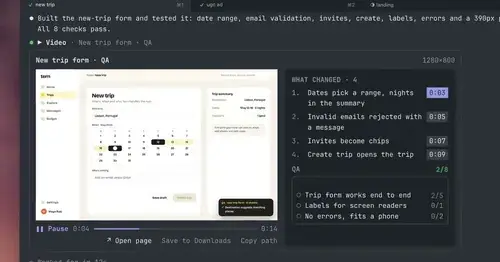
show-your-work
Claude shows screenshots and recorded Playwright runs in the chat, with before/after QA.
cc-stretch
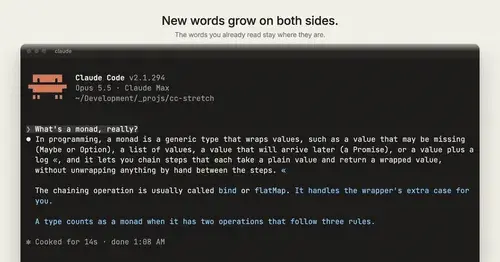
Replies arrive short; click a phrase and it grows in place, click « to fold it back.
Habblaud
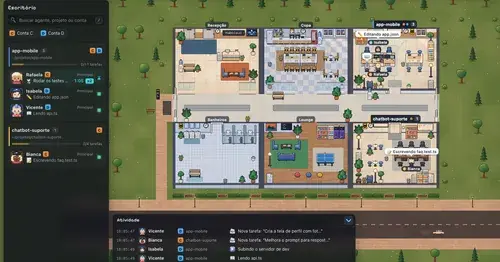
A pixel-art office where each Claude Code agent shows, live, what it is doing.
context-bar
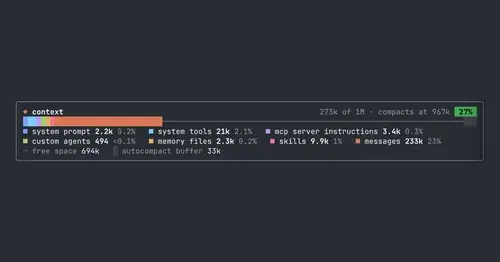
Your context window as one stacked bar above the prompt, a color per category.