Dashboards·terminal·MIT
Habblaud
A pixel-art office where each Claude Code agent shows, live, what it is doing.
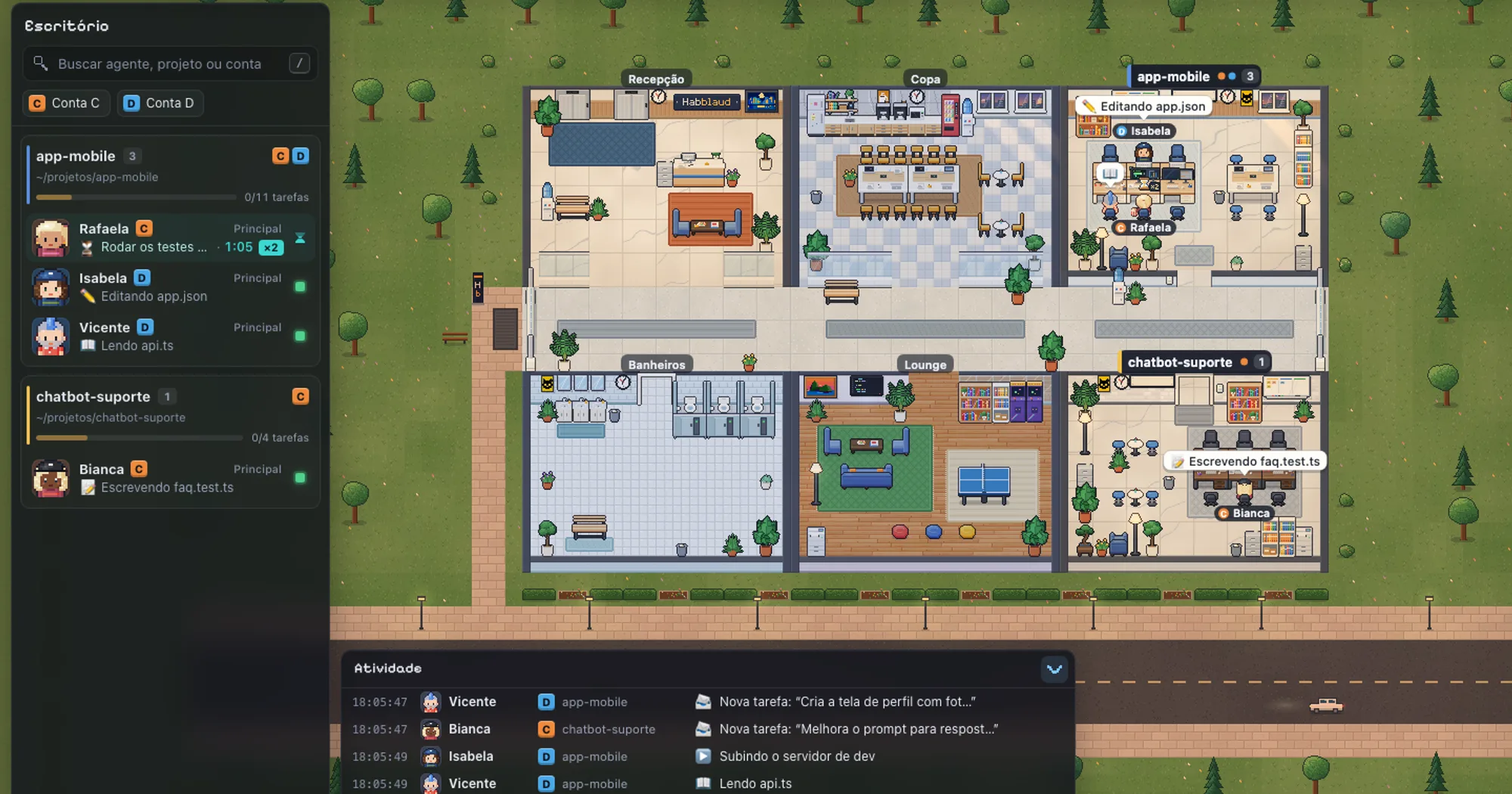
Habblaud turns every Claude Code session on your machine into a pixel-art character in a web office. Each project with an open session gets a room, and each agent shows in real time whether it is reading, editing, running tests or waiting for you. It is a local web app plus a small mod that ties your sessions to it, and its interface is in Brazilian Portuguese.
What it does
- Rooms and characters. Every agent gets a unique name and a chip with its account letter. Subagents arrive by the elevator, work in the room, walk over to hand their result to the agent that called them, and leave.
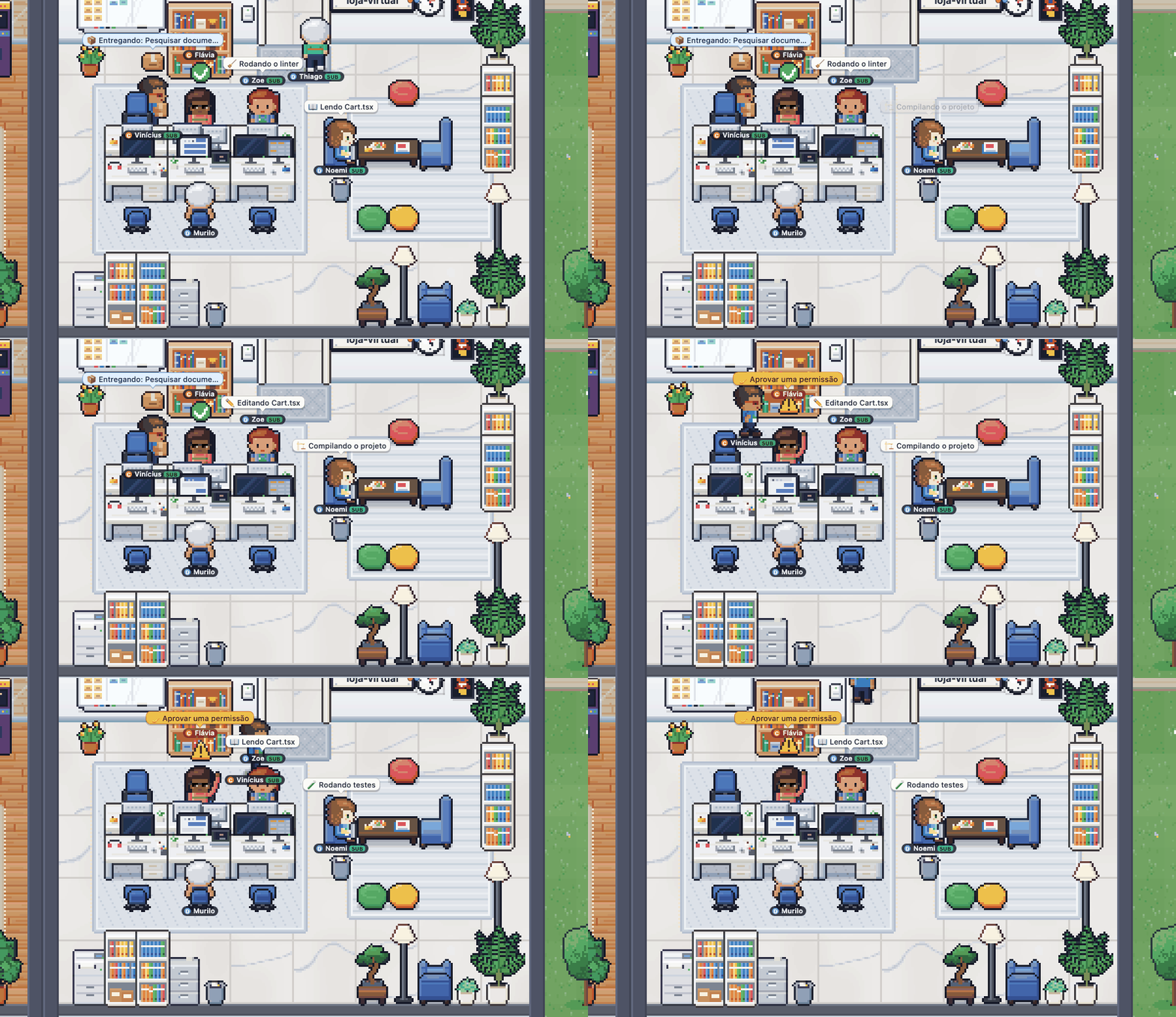
- States you can read at a glance. Typing at the desk while working. Hand raised and a blinking alert when it waits for a permission or an answer. An hourglass and a timer when a turn ended with a shell command still running, then confetti or a rain cloud when it finishes. Wandering to the kitchen or the lounge when idle.
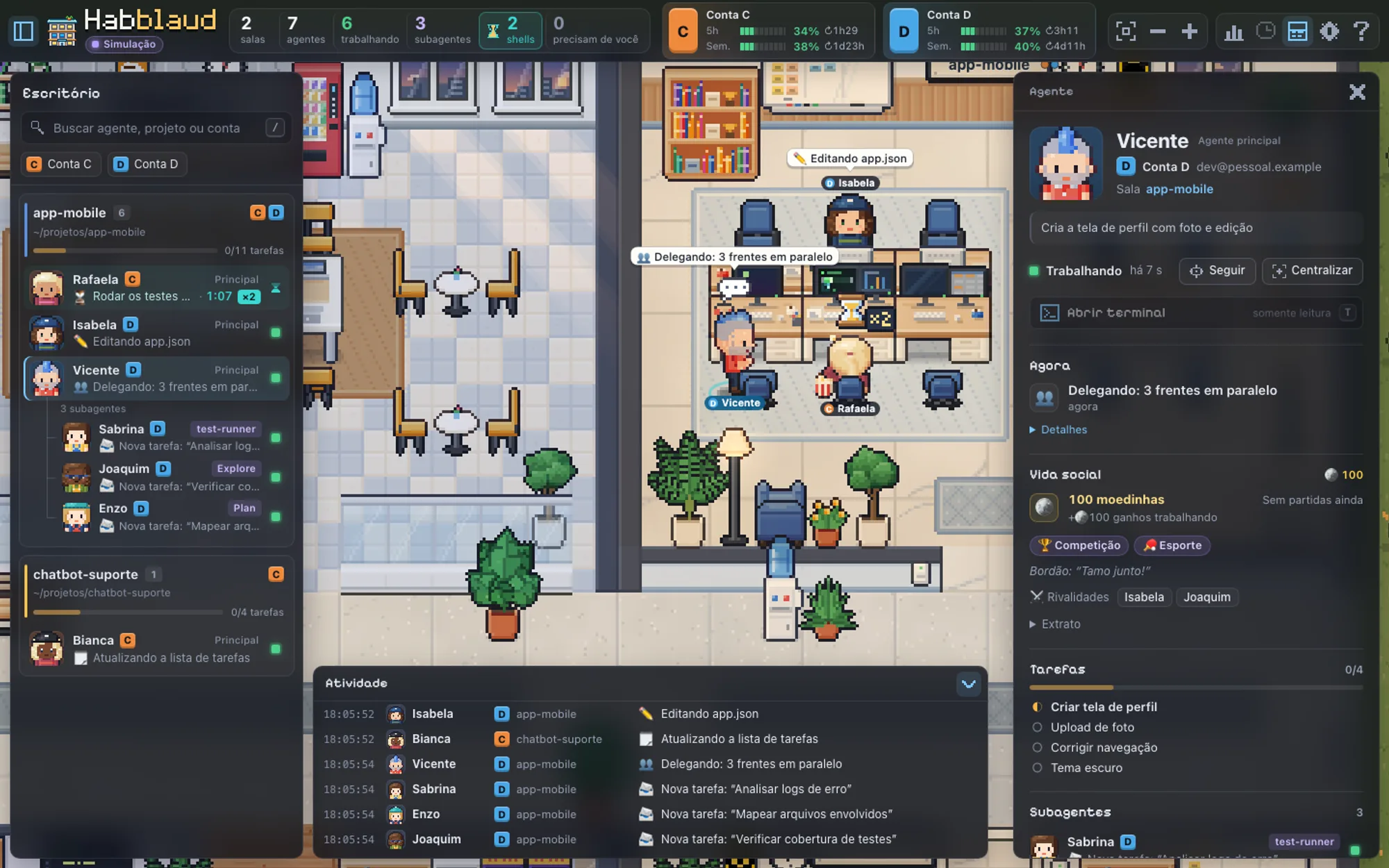
- Plan usage. The top bar shows how much of each account’s five-hour and weekly limits you have used and when each resets. Several Claude Code accounts (
~/.claudeand any other~/.claude*config folder) appear side by side. - Agent drawer. Click a character for its current activity, tasks, subagents, timeline and stats: tools, tokens, cost, lines changed, model and branch. Its terminal view shows the session’s conversation live, and a history opens the sessions of the last seven days.
- Timelapse and “Meu dia”. The timelapse replays the day at 60x, 180x or 600x. “Meu dia” (my day) totals how long agents worked and how long they waited for you, by hour, project and account.
- Ambience. Day and night follow your local clock, and sounds are optional. A PR opened or merged drops confetti on the room; a failed CI run sets off an alarm. Idle agents gather for TV, ping-pong or rock-paper-scissors for fake coins, which never touches the real agents.
- Codex too. Sessions from OpenAI’s Codex CLI or app join the same office, sharing the room when both work on one project.
- Phone. The layout adapts to small screens, for when you open it over your Wi-Fi (see How it works).
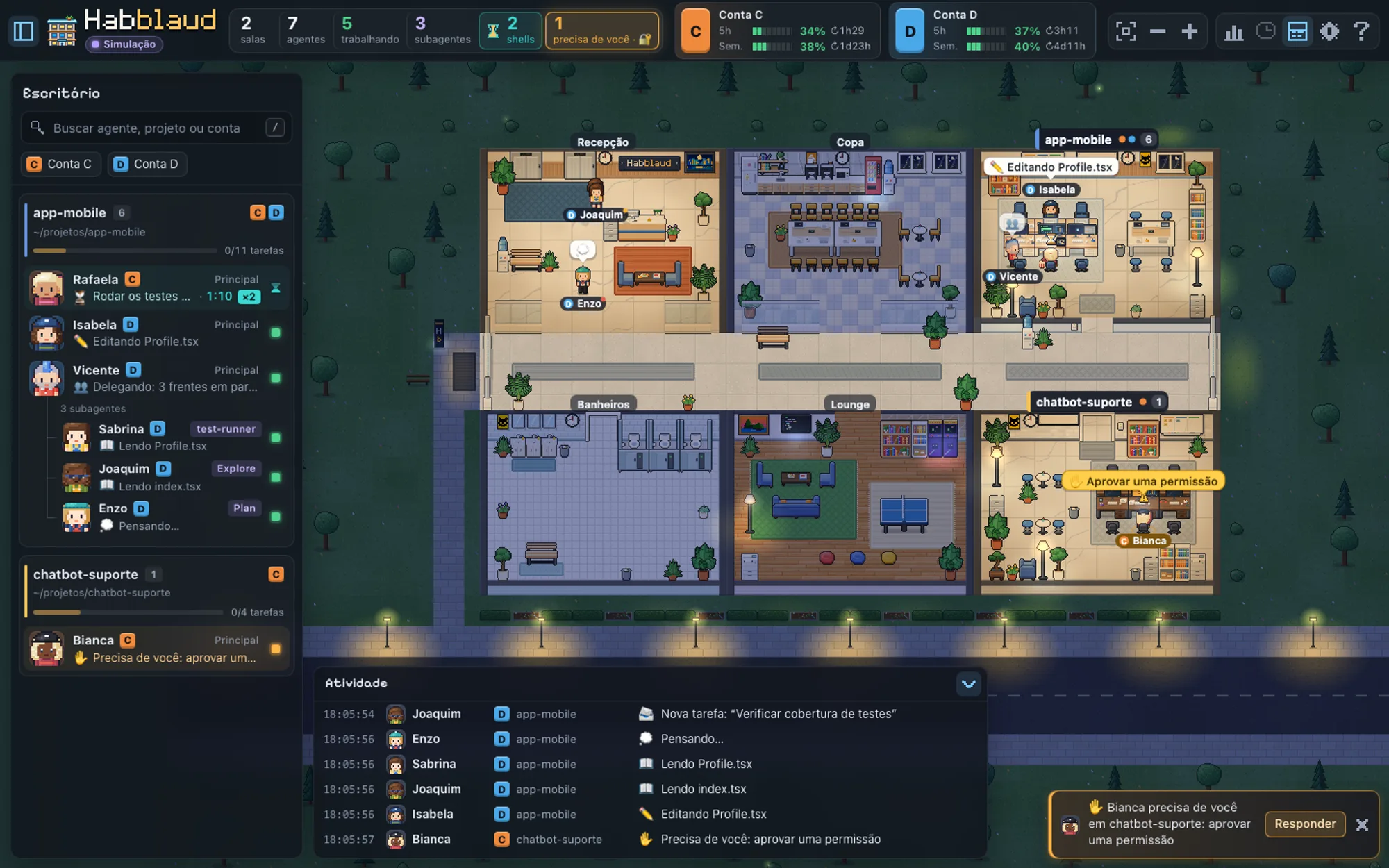
Two companion plugins, installed with the mod, let the office act on sessions:
habblaud-permissoesputs permission requests and the agent’s questions (AskUserQuestion) in the office, with buttons to approve, approve and stop asking (when Claude Code offers that rule), deny with a reason, or pick an answer. The terminal dialog stays open too, and the first answer wins.habblaud-mensagensadds a message box that types into the session as if you had typed in its terminal. If the agent is busy, the message waits for the turn to end.
Install
Needs Claude Code 2.1.287 or later, plus Node.js 22.12 or later with npm, on macOS or Linux (the author tests on macOS). Docker is optional.
git clone https://github.com/marmottajr/habblaud.git
cd habblaud
npm install
npm run docker:up
npm run mod:install
npm run docker:up builds and starts a container that restarts with Docker; it detects your Claude Code accounts and mounts only the folders it needs, read-only. Without Docker, run npm run build and npm start instead. npm run mod:install installs the mod and both plugins in each account through claude plugin, straight from the clone. To leave a plugin out:
npm run mod:install -- --sem-permissoes
npm run mod:install -- --sem-mensagens
Open http://localhost:4747 and start Claude Code in any project: your agent walks in. Inside Claude Code, /habblaud prints a summary of the office, and a line under the prompt names any other session that needs you. Sessions already open pick up the mod with /reload-plugins. To look around first, add ?mock=1 to the URL for a simulated office.
npm run mod:status checks each account. Because the mod loads from the clone, run npm run mod:install again if you move the folder, and npm run mod:uninstall before you delete it. To update, git pull, npm install and npm run docker:up, which also refreshes the mod where it is installed.
How it works
The mod hooks three events. On session.start and each session.measure (after every turn, and when a limit moves a whole point) it writes the plan’s five-hour and weekly percentages, with their reset times, to ~/.habblaud/usage/<account>.json. That file is all it saves. Every 5 seconds it asks the local server at http://127.0.0.1:4747/api/mod/summary who needs you, sending its account and session id so it can leave itself out; with the server down, the line clears and it asks every 30 seconds. It does not read the conversation or call the model, so /habblaud costs no tokens. In claude -p and the Agent SDK it does not poll.
The office is the server. Every second it reads the files Claude Code already writes: the open-session records in sessions/ and the project and subagent transcripts in projects/. From those it builds activities, tasks, stats and GitHub events (no GitHub calls), and streams them to the browser. It also reads the email, organization and /usage cache from each account’s .claude.json, and, from your shell files, only the alias lines that launch claude, to give each account its letter. It reads no credentials and masks known token and password formats before anything reaches the browser. It keeps character names, a timeline of on-screen summaries for the timelapse (7 days, in ~/.habblaud/timeline/, off with HABBLAUD_TIMELINE=0) and the daily stats (30 days).
Nothing about your sessions leaves the machine. The only outbound call is an anonymous check of the repository’s latest GitHub release every 6 hours, which shows GitHub your IP and version; HABBLAUD_UPDATE_CHECK=0 turns it off. The server listens on 127.0.0.1:4747 only. Setting HABBLAUD_BIND=0.0.0.0 (Docker) or HABBLAUD_HOST=0.0.0.0 (Node) lets your phone in, but then anyone on the network sees the agents’ commands, files and session titles; the terminal view, answering and messaging switch off while the port is exposed.
Answering and messaging work only over localhost, and a website open in your browser cannot send them. Any program on your machine that can reach localhost:4747, including an agent running a command, can still answer a permission or drop a message into another session. On a shared computer, or with agents running unattended, leave those plugins out. A permission request goes to the office only while a Habblaud page is open; otherwise, or after 5 minutes without an answer, it stays in the terminal. Message text is dropped once delivered.
Limitations
- The interface, the line under the prompt and the
/habblaudsummary are in Brazilian Portuguese. - The server reads Claude Code files whose format is undocumented, so a Claude Code update can break it, partly or wholly, until Habblaud is adjusted.
- Usage figures need a subscription plan and arrive after each account’s next response.
- The timelapse and the daily stats cover only the time the server was running.
- In Docker, a Claude Code process killed abruptly can leave its character in the office; the Node mode checks processes and avoids it.
More mods
The whole directory →
agent-flow
Every subagent of the session in a live tree beside the transcript. Zero tokens.
agent-profiler
Model wait, tools and subagents as shares of session time, live, with OTLP export.
todos
The repo's TODOs and FIXMEs above the prompt at session start, newest first.
budget-guard
Warns at 80% of a cost or plan-window limit you set, then refuses tool calls past it.