Context & memory·terminal · desktop · mobile·MIT
auto-handoff
Hands a long session to a fresh one with a Haiku-written brief instead of compacting.
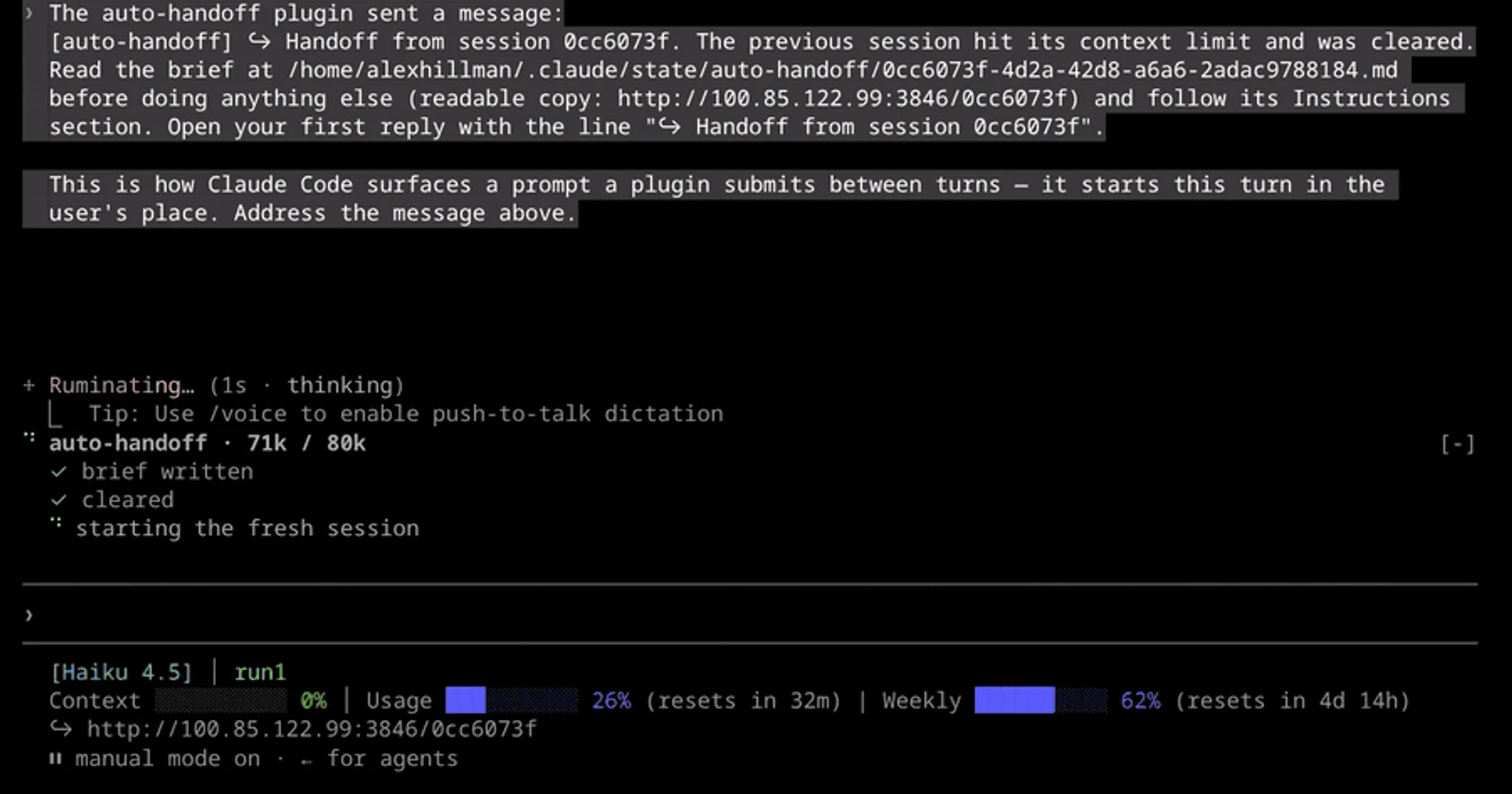
auto-handoff replaces Claude Code’s auto-compact with a handoff to a fresh session. Before the context fills, Haiku writes a structured brief of the work to disk, the mod runs /clear, and the new session gets one line telling it to read the brief and carry on. It is for long sessions where you want to decide what survives the reset, instead of accepting a summary you cannot steer.
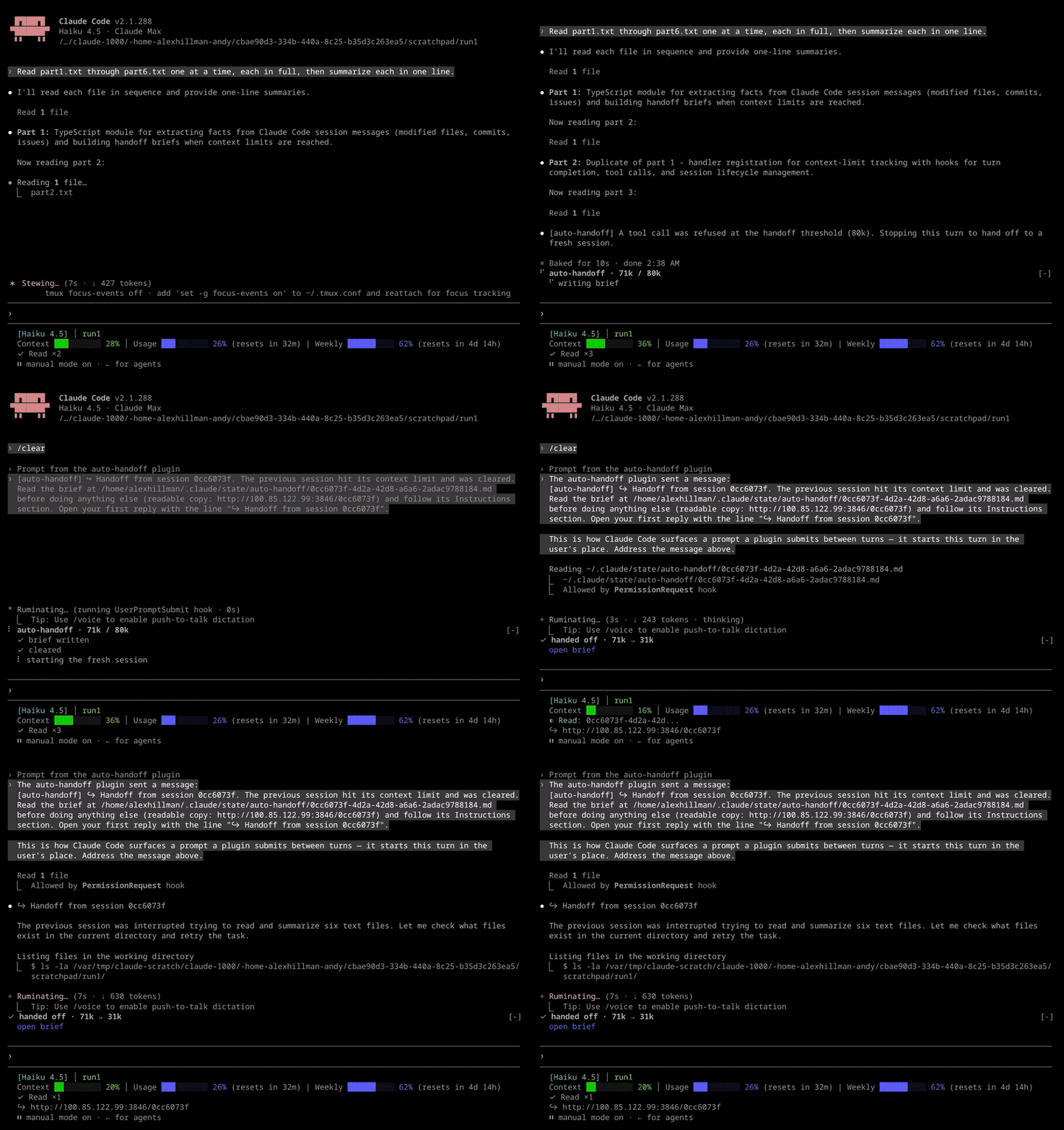
In the author’s demo the threshold is lowered to 80k. The mod refuses a file read at the threshold, writes the brief and clears, and the fresh session is working again about seven seconds later, at 31k tokens instead of 71k.
What it does
- A brief you can shape. By default Haiku writes sections for work in progress, decisions, assumptions to verify, dead ends, your last request and whether it was answered, and the next step. Edited files, commits and GitHub issue numbers are added from the transcript in code, so they do not depend on what the model remembers.
- Real numbers only. The brief receives the tokens at handoff, the threshold and where it came from, and the session’s starting size. Any other token figure Haiku writes is flagged
[unverified: not in Handoff Numbers]. If Haiku fails or returns none of the expected sections, a facts-only brief stands in and the panel says so. - Checks before each request, not only after each turn. The mod adds an estimate of tool output not yet measured to the last measured context size. Past the threshold it refuses further tool calls, so one burst of parallel reads cannot blow through the window; the author saw a single step take a session from 67k to 437k. A refused call always ends in a handoff.
- Takes the place of auto-compact. When Claude Code’s own auto-compact fires first, the mod skips it and hands off instead. If a loop guard or a kill switch stops the handoff, auto-compact runs as usual. A
/compactyou type yourself still compacts. - A panel above the prompt. It ticks off writing the brief, clearing and starting the fresh session, then shows the sizes before and after (
162k → 45k, for example) with anopen brieflink, and collapses after 10 seconds. Failures, a facts-only brief, a pause and a threshold set too tight stay up until you press Dismiss. - A readable page per brief. Each brief also becomes an HTML page that links to every handoff in the same run. By default it is served on your Tailscale IP at port 3846 with a short link, so you can open it from a phone on your tailnet. Without Tailscale it is served on
127.0.0.1. - Loop guards. A fresh session must grow 40k tokens past its starting size before it can hand off again, and after two handoffs with no message from you the mod pauses until you type one.
- Optional status line link.
statusline/handoff-link.shwraps your existing status line command and adds a line with the brief page’s link in sessions that came from a handoff. It needsjq.
ctx-handoff also clears and reseeds, but at 600k tokens or 80% of the window, with the handoff written by a fork of the main conversation. fast-jev-compaction keeps compaction and changes what it cuts: TypeSafe’s Jev drops stale tool calls and everything kept stays verbatim.
Install
Needs Claude Code 2.1.287 or later and git. The repository has no marketplace, so you clone it and load the folder with --plugin-dir:
git clone https://github.com/alexknowshtml/claude-auto-handoff.git ~/claude-auto-handoff
claude --plugin-dir ~/claude-auto-handoff
To load it in every session, set CLAUDE_CODE_PLUGIN_DIRS to the folder in your shell, or in the env block of ~/.claude/settings.json:
{ "env": { "CLAUDE_CODE_PLUGIN_DIRS": "~/claude-auto-handoff" } }There is nothing to run: the handoff fires by itself at 160k tokens. To watch one sooner, export AUTO_HANDOFF_TOKENS=60000 before starting Claude Code. It stays live in that shell after the test. Below about 85k, fresh sessions (which start near 45k) hand off at their starting size plus 40k instead, and the panel names the variable.
The settings are rows under auto-handoff in /config:
threshold(160000): the context size that triggers a handoff. The default is sized for a 200k window, with room left for the brief and the turn in flight; raise it if your model has a larger one.maxConsecutiveHandoffs(2): handoffs allowed before you type a prompt.briefTemplateandinstructionsTemplate: the two Markdown files that shape the brief, copied on first start to~/.claude/auto-handoff/brief.mdandinstructions.md. Each##heading inbrief.mdis a section Haiku writes. Edit those copies, not the repo’s, and delete one to get the default back. Leave out files and commits sections: the mod adds them.ignoreFiles: a regex for edited files to keep out of the brief, such as caches.viewer(tailscale:3846): where to serve the pages, ashost:port. Leave it blank for no server; the link then opens the local file.
AUTO_HANDOFF_DISABLE=1 stops handoffs for one session. DISABLE_AUTO_COMPACT stops them too, so the mod stays out of the way of a wrapper that pipes the session, where /clear would break the pipe.
How it works
The mod acts on your behalf at the threshold: it runs /clear through command.run and sends the seed line through prompt.submit. Subagent turns and tool calls are left alone.
- What it reads.
turn.completeandturn.stepread the session’s context usage.tool.callcounts the characters each tool returns, at four per token, and can refuse a call.prompt.submitonly checks whether a prompt came from you, to reset the loop guard. At a handoff the mod reads the transcript: the last 120 messages, each cut to 2,000 characters and tool inputs to 300, up to 150,000 characters in all. - What it spends. Each handoff is one Haiku request through
model.completewith that transcript, capped at 4,000 output tokens and 60 seconds. It draws on your usage like any other model request; the author does not state its cost. The fresh session then reads the brief, which tells it to verify each line (git status, reading the file) before acting. - What it saves. Briefs go to
~/.claude/state/auto-handoff/<session-id>.md, their pages topages/in the same folder, and everything the mod does toauto-handoff.logthere. A brief holds your last request word for word, the paths you edited, commit subjects and the transcript’s path. Nothing in the module deletes old briefs or pages. - Network. The page server is a small
nodeprocess the mod launches detached throughsh, and starts again, at most every five minutes, if it has stopped. It serves only the pages folder’s.htmlfiles, on the addresstailscale ip -4returns, so any device on your tailnet can open them. The pages load a Markdown renderer from cdnjs and fonts from Google Fonts when you open them. In the 0.8.6 code the server is started even withAUTO_HANDOFF_DISABLEset, although the README says that variable turns it off; leaveviewerblank if you want no server.
Limitations
- The estimate for tool output can run high, so a handoff sometimes fires with the real context below the threshold.
- On Windows, supported since 0.8.5, there is no
sh: the page server does not start and the link opens the page as a local file. - The author says the panel is drawn in the terminal and in Desktop. On the mobile app and in VS Code, which do not draw it, the threshold, the result and anything that stays up arrive as toasts.
- The seed line’s brief path and page link are clickable only in terminals Claude Code detects as supporting links. Over SSH, set
FORCE_HYPERLINK=1if your terminal handles them, or use the status line link. - The README names no Claude Code version; the demo was recorded on 2.1.288. Mod events and methods can change between versions.
More mods
The whole directory →
cache-keepalive
Keeps the prompt cache warm while background tasks run, and caps what the pings cost.
cache-keeper
Prompt-cache timer, keep-warm pings, cold-send guard, a board of chats and a handoff.
cache-tax
Blocks a cold prompt-cache send once with its price, then keeps the cache warm for hours.
cc-mod-park
Bookmark an unfinished session and exit; resume it later from the same folder.