Dashboards·terminal · desktop·MIT
session-hud
Branch, context meter and weekly usage above the prompt, with a session details pane.
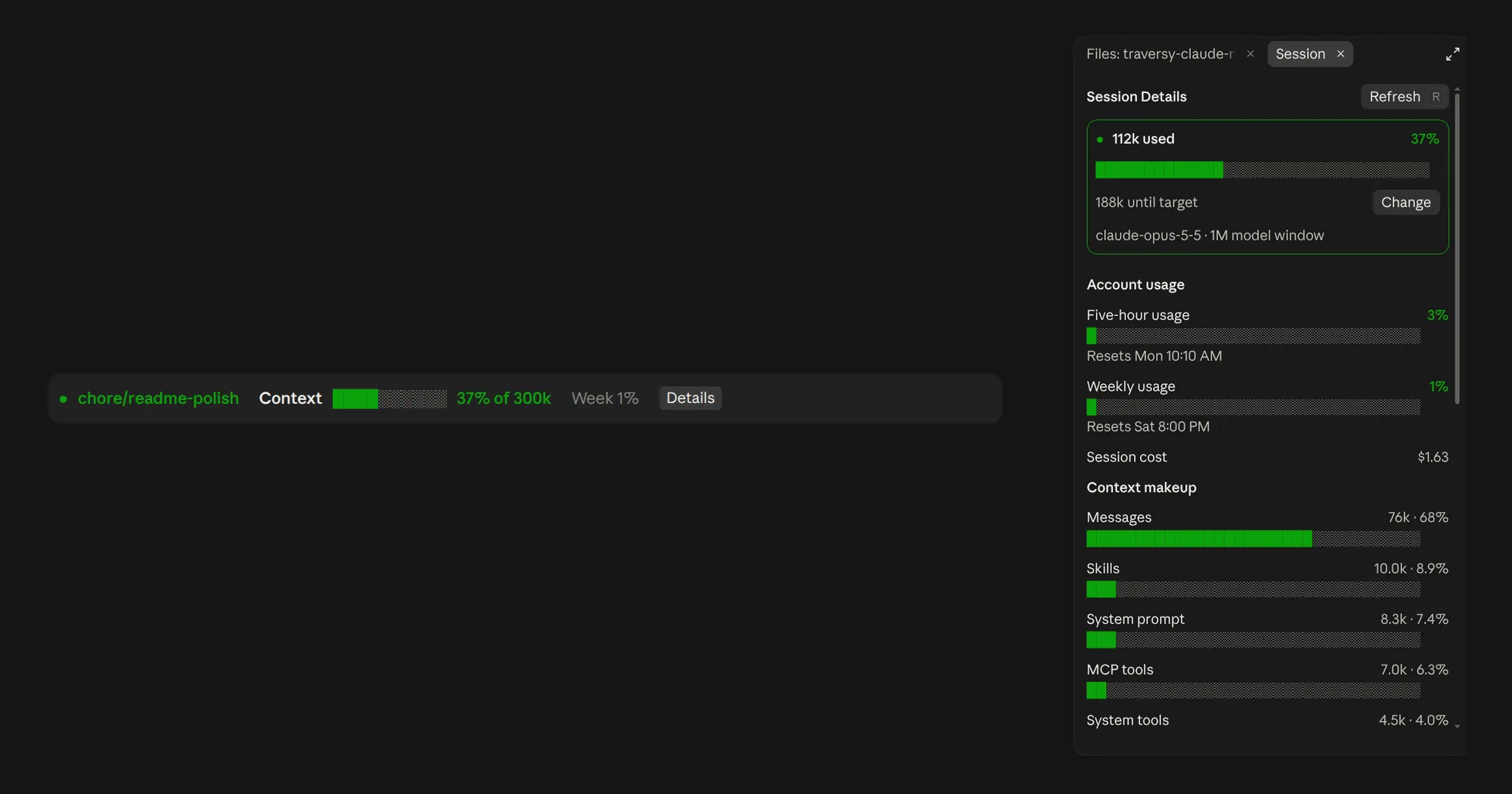
session-hud draws one line above the Claude Code prompt: the Git branch you are on, how much context the session has used against a target you set, and your weekly account usage. A Details button at the end of the line opens a Session Details pane with your account limits, the session cost and what is filling the context.
What it does
- Branch. Green on a working branch, yellow on
main,masteror a detached HEAD, and “Not a Git repository” outside one. It checks every five seconds, so a switch made in another terminal shows up too, and again as soon as a Bash command from Claude finishes. Long names are cut in the middle. - Context meter. A bar and a label such as
37% of 300k, measured against your target, 300k tokens by default. Yellow from 70 percent, red from 90. The bar stops filling at 100 percent; the number keeps going. - Week. Your seven-day account usage, shown once Claude Code reports that limit.
- Session Details. Tokens used, your share of the target and the distance to it (
188k until target, or how far over), with the model and the size of its window. Five-hour and weekly usage with bars and reset times, and the session cost when Claude Code reports one. The context split by category, largest first; the model window with free space, the autocompact buffer and deferred tokens; and the five MCP servers with the most tokens loaded, each with how many of its tools are loaded. A picker lists any server’s tools ten at a time and marks the deferred ones.
The target is a yardstick, not a limit: it changes neither the context window nor when Claude Code compacts. To change it, press Change in the pane and type a value such as 200k or 1m (anything from 10k to 10m), or set Context target in /config. It is saved with the plugin, and the new percentage appears once the mod reloads.
Install
Needs Claude Code 2.1.287 or later. For the Code tab of Claude Desktop, the author asks for a desktop build that includes Claude Code 2.1.286 or later.
claude plugin marketplace add bradtraversy/traversy-claude-mods
claude plugin install session-hud@traversy-mods
Start a new session or run /reload-plugins, then send a prompt so Claude Code records usage, and the line appears above the prompt. In the pane, r refreshes and Esc closes. In the terminal the pane uses a narrower layout, and the Details button hides while it is open.
session-hud used to live in bradtraversy/claude-mods, a repository that has since been deleted. Its marketplace had the same name, traversy-mods, so if you installed from there, Claude Code may still point that name at the old repository; removing the old marketplace before adding the new one avoids the clash.
The marketplace, from Brad Traversy of Traversy Media, now holds three mods: this one; tool-cards, which redraws tool calls in the transcript as cards; and next-steps, a fork of Hamza Zafar’s mod of that name that suggests your next prompt after each turn and adds buttons on the desktop. next-steps shares the band above the prompt with session-hud. Each passes on what the other draws, so the suggestions sit above this line.
How it works
The line redraws whenever Claude Code reports a new context measurement, and its numbers are Claude Code’s own session usage. The branch comes from git branch --show-current, or git rev-parse --short HEAD when detached, run locally with a five-second timeout. The mod hooks Bash tool calls only to know when one has finished; it does not read the command. The full context breakdown is counted when you open Details or press Refresh, never in the background, and it is dropped on /clear or resume. The mod makes no network requests and no model calls, and the only thing it saves is the context target.
Limitations
- Claude Code gives a reliable total for messages but no count per message, so the pane shows the conversation as one figure.
- The author documents it in the terminal, in local sessions of the Desktop Code tab, and in SSH sessions there when plugins are available on the remote host. The VS Code chat panel,
claude -p, Agent SDK and cloud sessions show nothing, and WSL sessions opened from the desktop app have no plugins at all.
More mods
The whole directory →
agent-flow
Every subagent of the session in a live tree beside the transcript. Zero tokens.
agent-profiler
Model wait, tools and subagents as shares of session time, live, with OTLP export.
agent-pulse
One card per subagent with status, time and current tool, plus its recent transcript.
agentpane
Every subagent of the session in a side pane: what it runs, its tokens, its conversation.