Dashboards·terminal · desktop·MIT
plan-progress
Claude's plan as live progress bars above the prompt, with subagents under each task.
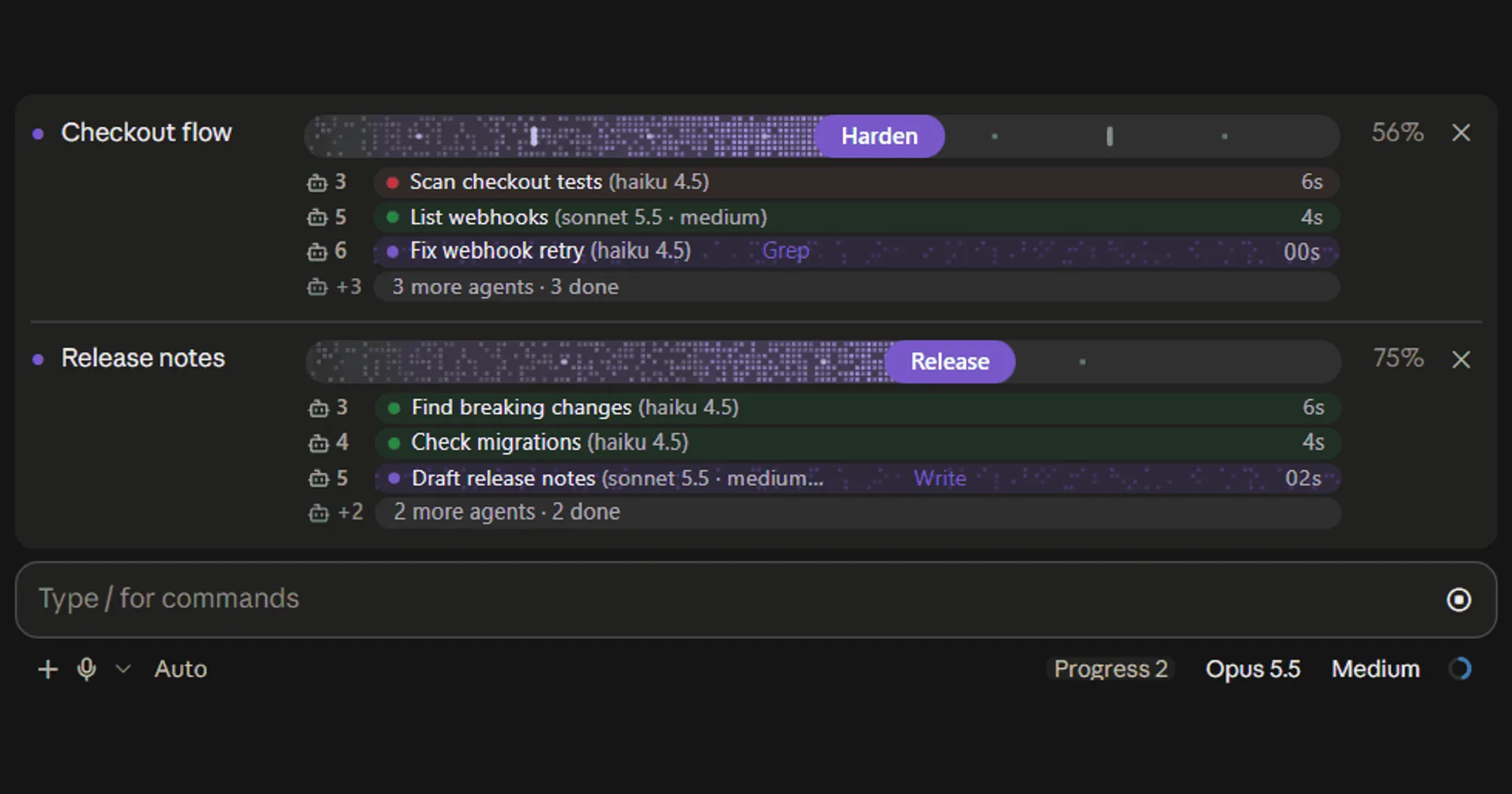
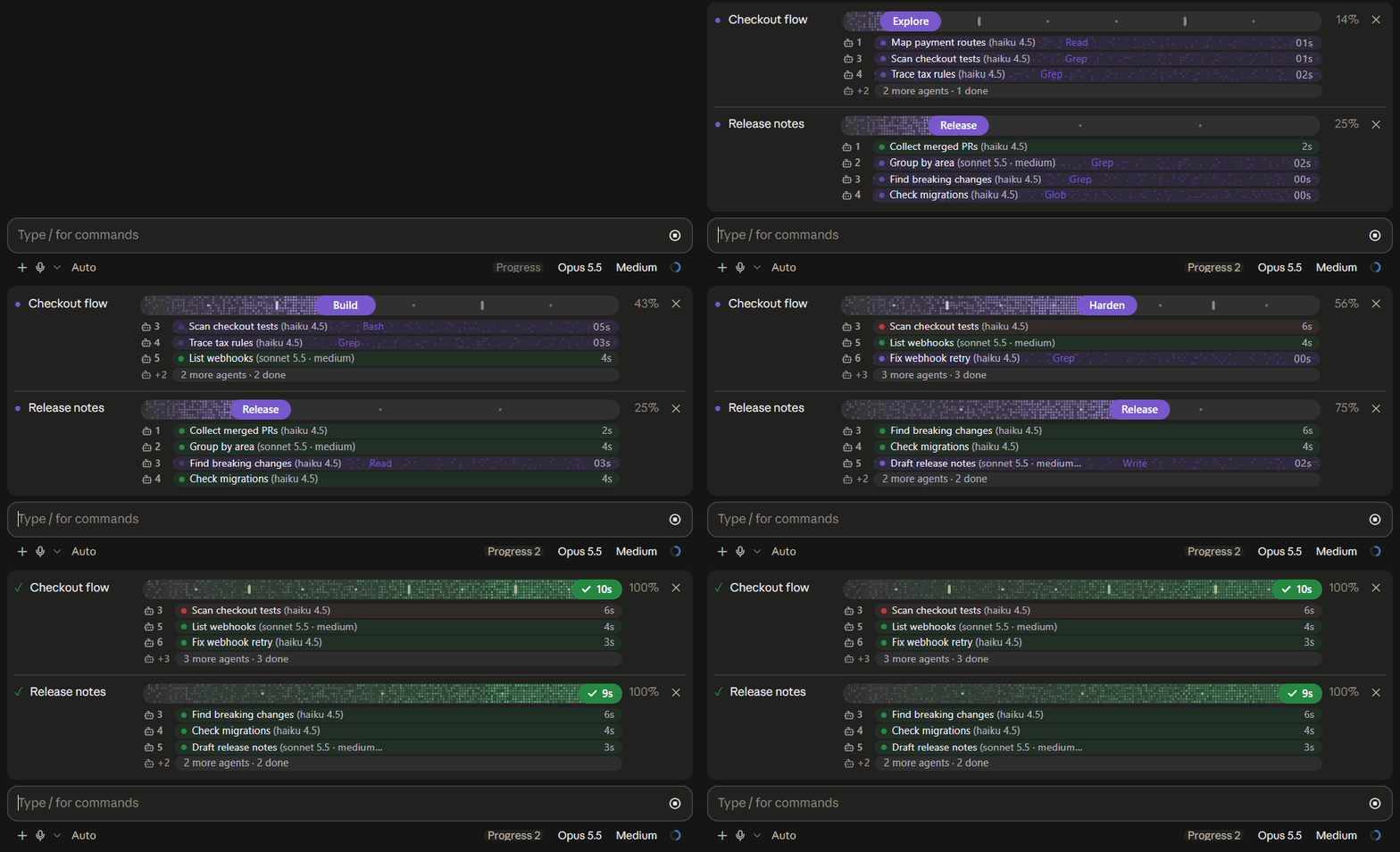
plan-progress shows Claude’s plan for a task as a live progress bar above the prompt. Claude splits medium and large tasks into stages and steps through a tool the mod adds, the bar fills as each step finishes, and the subagents working on that task appear under it. Soft sounds mark a question for you, an error and the end of the task.
What it does
- One row per task: a state mark, the title, the bar, the percent and a close button. Up to three bars show at once; a new one pushes out a finished bar first, otherwise the oldest.
- Four states, each with its own colour: running (violet), needs input (amber), error (red) and done (green). A finished bar shows how long the task took.
- The bar in the desktop app is a pixel fill with a capsule at each stage boundary and a dot at each step. A pill on it names the current stage. Hover a checkpoint to see the step and how long it took, or the pill to see how long the plan has run. In the terminal the bar is a line of text with the stage name and the step count.
- Subagents appear as strips under the task that started them: name, model and effort (
haiku 4.5,sonnet 5.5 · medium), the tool in use and a running clock. A strip turns amber while its agent waits on a permission prompt. Finished strips fold after five seconds; failed ones stay until you close the bar. Subagents started with no task open get a bar of their own, Agents. - Plans can change mid-run. When Claude resends the stages, steps already finished keep their state by title and the percent follows.
- Plan mode: a plan you approve becomes a bar named
plan, read from the plan’s headings and lists. - Resume: the bars are saved per session and come back when you resume it, without the subagent strips.
- A Progress button in the footer is there whenever the mod is loaded. It hides and shows the bars.
A fork, 0x5421/plan-progress, offers six bar styles.
Install
Needs Claude Code 2.1.287 or later.
claude plugin marketplace add zycck/claude-mods
claude plugin install plan-progress@zycck-mods
Restart Claude Code, then run /progress-demo for a sample bar. From then on a bar appears when Claude starts a task with several steps. /progress hides or shows the bars, /progress-sounds plays the three sounds and /progress-clear removes every bar.
How it works
At session start the mod registers a plan_progress tool. Claude creates a bar once, with a title and the full list of stages and steps, then moves it with short calls: the next step, steps done, the active step, a failed step, or a state with a one-line note. A step name the bar does not have is refused with the list of its steps. The bar knows only what those calls report. The one exception is an approved plan-mode plan, which the mod parses itself.
It adds to the model’s context in four places:
- The tool’s definition, in the tool list.
- A short block of rules in the system prompt, cached for the session. It tells Claude when to make a bar, how to update it, and never to describe the bars to you.
- One line on each message you send while bars are open, listing them with their stage and step.
- The tool calls themselves. The author puts each update at a few dozen tokens. Subagent strips come from engine events and cost no tokens.
The mod also steers Claude toward the bars. In a turn with no open bar, the fourth file edit is refused once with a request to create one. After six edits without an update, Claude gets a reminder. A turn that did work and ends with a bar still open is sent back once to update it; a turn that ends in a question marks the bar as waiting for you instead. Shell commands are never refused or counted. The mod looks at tool names, not at what the tools run.
The bars are kept in the mod’s own store, keyed by session, for the last 20 sessions. It makes no network calls. On Windows it plays the sounds by launching PowerShell, because the engine’s player can stay silent there; elsewhere it uses the engine’s audio. The only file it writes is a timing log for the author’s demo-recording mode, which runs only when a bar is sent with the id reel.
Limitations
- The pixel bar, the hover times and the subagent strips need the desktop app. The terminal gets the text bar and no strips.
- There is no setting to turn the sounds off. Hiding the bars with
/progressleaves them on. - A bar moves only when Claude reports a step, so it can trail the work. The reminders exist for that reason.
- A reload of the mod forgets running subagents: their strips stay as they were until you close the bar.
More mods
The whole directory →
agent-flow
Every subagent of the session in a live tree beside the transcript. Zero tokens.
todos
The repo's TODOs and FIXMEs above the prompt at session start, newest first.
budget-guard
Warns at 80% of a cost or plan-window limit you set, then refuses tool calls past it.
bullswarm
Quota meters for every agent CLI, and Claude subagents routed to the pool with surplus.