Automation·terminal·MIT
Loop Breaker
Refuses repeat failures and edit ping-pong, with a stuck meter above the prompt.
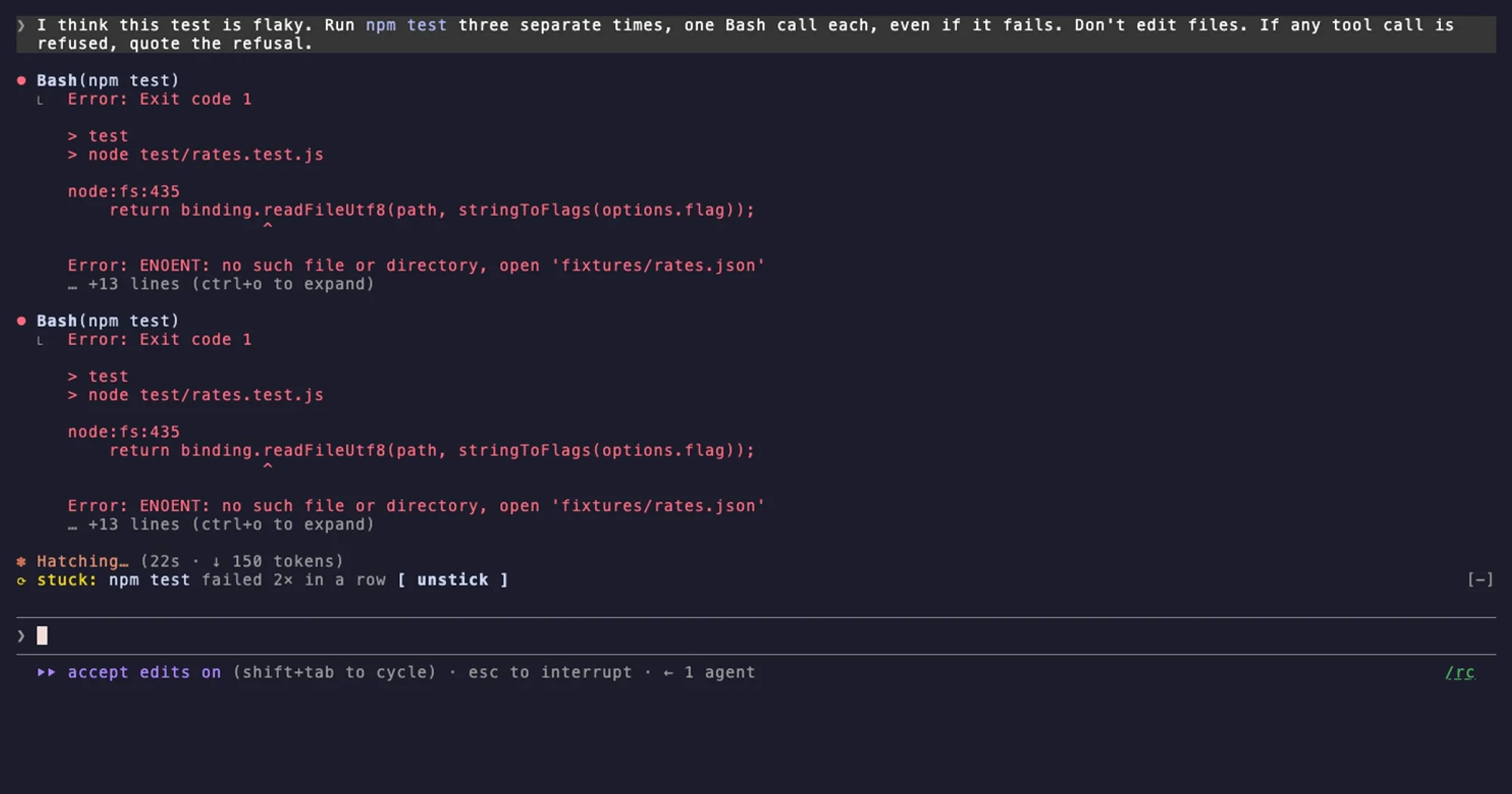
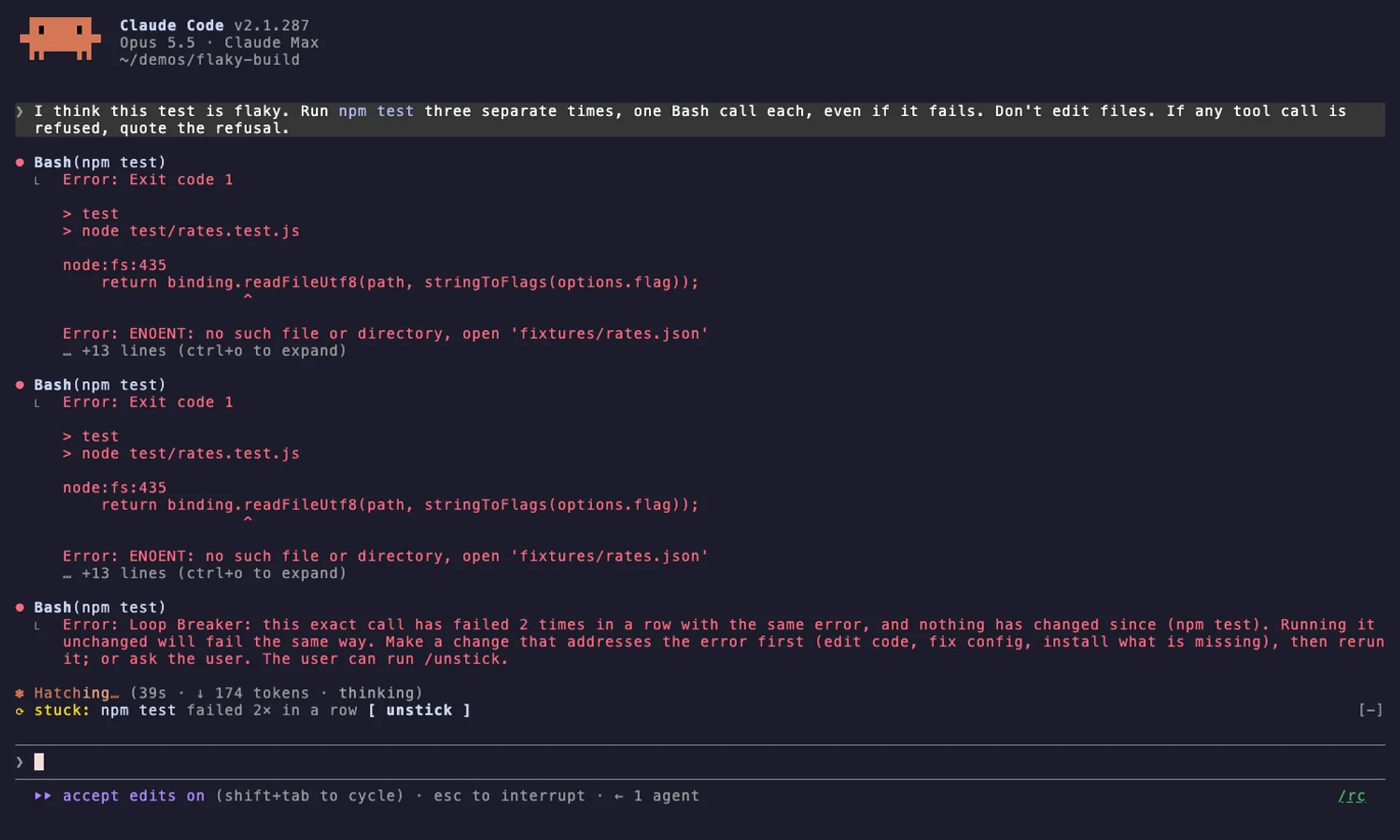
Loop Breaker stops Claude Code from going round in circles. If the same tool call fails twice in a row with the same error and nothing has changed, it refuses the third try. If edits keep flipping a file between the same two versions, it refuses the fourth flip. Either way the model is told to fix the cause or ask you, and a line above the prompt shows what is stuck.

What it does
- Repeat failures. A failure joins a streak only when the call has exactly the same arguments and the same error as the one before. Anything that changes files ends every streak: a successful Edit, Write or NotebookEdit, a shell command that changed files, or a change by a subagent. A different error or a success ends it too, so the usual fix-and-rerun loop is never blocked.
- Oscillation. A flip is an Edit or Write that puts the whole file back exactly as it was before the previous change. After three flips in a row, the fourth is refused and the model has to choose a version based on evidence. Small, similar swaps in different places of a file don’t count, and a change by anyone else breaks the chain.
- Stuck meter. From the second identical failure, a line above the prompt reads like
stuck: npm test failed 2× in a row, with anunstickbutton. It marks subagent streaks, and it sits on top of any other mod’s band without hiding it. /unstick. Clears the whole history at once, even mid-turn, and lets refused calls run again. A new prompt from you,/clearor resuming a session also clears it. Background notifications and scheduled prompts don’t.
Install
Needs Claude Code 2.1.287 or later.
claude plugin marketplace add ccdwyer/claude-mods
claude plugin install loop-breaker@ccdwyer-mods
There is nothing to start: once loaded, it checks every tool call. Press unstick or run /unstick when you want a refused call to go through.
How it works
Everything happens in a tool.call hook, which sits around each tool call Claude and its subagents make. Before a call runs, the hook checks it against the history and can refuse it. After it runs, the hook records whether it failed and what it changed.
A call’s identity is the tool name plus every argument that affects what it does. Only its description and IDs are left out, and Bash commands are compared character for character. Errors are compared after stripping what differs between runs of the same failure: timestamps, durations, temp paths under /tmp and /var/folders, memory addresses, process IDs and notices about saved output. Both end up as short SHA-256 hashes. Failures of calls that started before a file changed are ignored, and interrupted calls or ones moved to the background count neither way. A Bash command counts as a change when Claude Code reports the files it touched, and git checkout, stash, reset or restore always counts.
For each successful Edit or Write, the mod hashes the whole file before and after, using what the tool reports. Once a file has flipped three times, the next Edit or Write to it is checked before it runs: the mod reads the file, confirms nobody changed it since, works out what the edit would leave, and refuses it if that is the older version again. This is the only file it reads.
A refusal reaches the model in place of the tool result. For a repeat, it says the call has failed that many times with the same error and will fail the same way unchanged, and asks for a change that addresses the error first (code, config, a missing install) or a question to you. For oscillation, it tells the model it is oscillating, to decide which version is right from evidence such as running the test, to say why, and then to make one different change or ask you. Both mention /unstick. When nothing is refused, the mod adds nothing to the conversation.
The history is kept per agent and in memory only: hashes, counts and short labels, never file contents. A finished subagent’s history is dropped, and a hot reload starts everything over. The meter’s label is the program name plus, for tools like git, npm or cargo, a known subcommand (npm test), or a tool and a file name or host. It never shows argument values, URL paths or search text. The mod makes no network requests, and the author states it collects no telemetry.
Limitations
- Calls sent in parallel in one message all run, so a repeat among them isn’t caught.
- A shell command that writes files and then fails counts as a plain failure, because its result is only error text.
- Notebook edits end streaks but aren’t checked for oscillation, and neither are files over about 4 MiB.
- The author shows the meter only in the terminal. Where Claude Code runs mods without drawing them, such as the VS Code chat panel or
claude -p, refusals still happen but there is no meter.
More mods
The whole directory →
agent-router
Pick the exact model for each subagent role, from any Anthropic-compatible endpoint.
Agent Time Machine
Every tool call on a branching timeline with snapshots: inspect, restore, branch, rerun.
autodev-core
Autonomous sprint loop: brainstorm, auto, iterate, audit, review, ship. Redacts secrets.
catalyst-probes
Model judges over subagent dispatches, defined in TOML. Plus your own prompt rules.