Automation·terminal · desktop·GPL-3.0-only
BitFrost
Codex, GLM and other coding apps on your machine as Claude Code subagents.
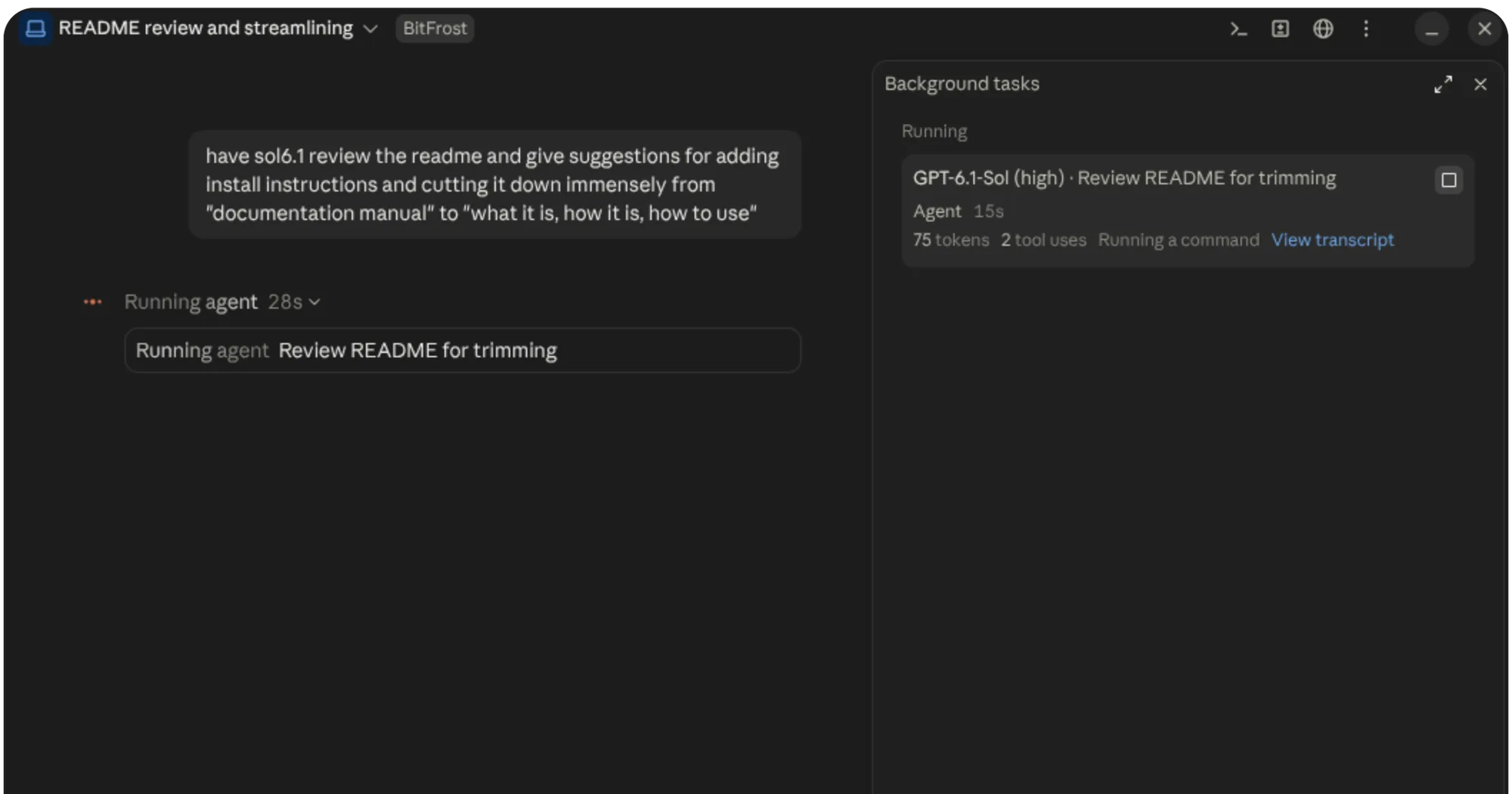
BitFrost lets Claude Code hand tasks to coding apps you already have installed and signed in: Codex for GPT models, ZCode for GLM, and opencode, Oh My Pi, Crush or Gemini CLI. Each model shows up as a subagent, its commands and edits appear in the transcript like a native subagent’s, and its work runs on that app’s account and plan, not on your Claude usage. The author documents it in the terminal and in Claude Desktop.
What it does
- Models by name. At the start of each session Claude is told which models you have and their short names, such as
sol6orglm. Ask for one in your message, with an effort if you want one (“glm on high”), and BitFrost uses the model you named even if Claude picked a sibling. - Permissions come to you. When the app asks to run a command or edit a file, you get a prompt with Allow once, Allow for this task, Switch to auto and Deny. No answer counts as Deny. The app’s questions come to you too; anything it marks as secret is not passed on.
- Auto mode. A subagent started while Claude Code is in auto mode runs in auto mode: its questions go to Claude, which answers with a message, and its permission requests go through a review (see How it works).
- Three tools for Claude.
statusshows what each BitFrost subagent is doing,messagesreads its transcript, andsendmessages it.interrupt: truerestarts its turn with the message, for apps that can’t take one mid-turn, such as ZCode. Claude’s own SendMessage to a running subagent also goes straight to the app, with a receipt saying whether it started, steered, queued or restarted the turn. - Restarts. If Claude Code restarts while a subagent works, BitFrost reattaches it to the same app session and replays what happened meanwhile.
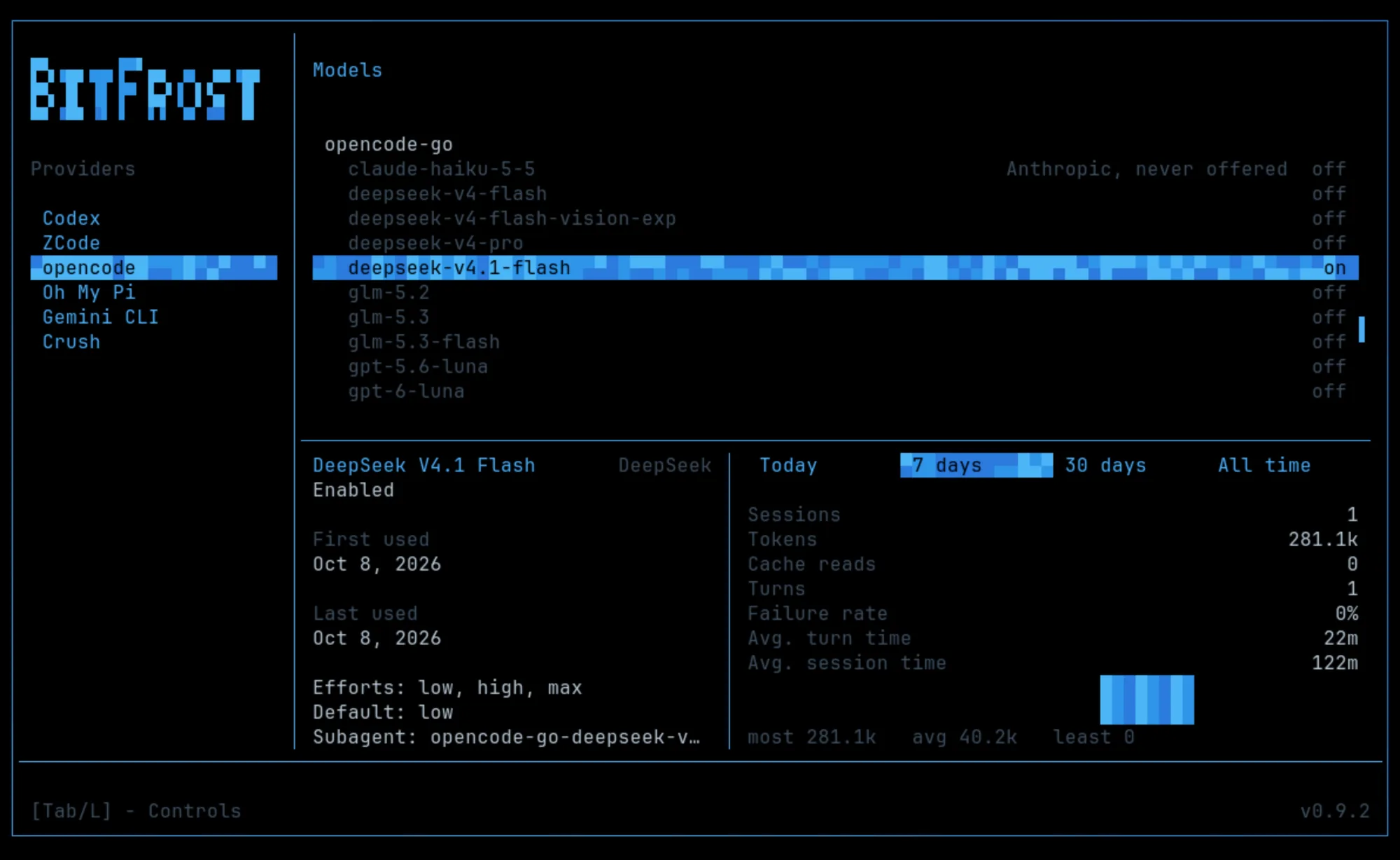
- Configuration screen. Run
bitfrostin a terminal. Models turns providers and models on and off and shows usage per model; Settings covers Claude profiles, official handback, history retention and app locations; Status shows sessions and the helper’s activity.
Install
Needs Claude Code 2.1.287 or later, Node.js 23.6 or later and Linux or macOS 12.3 or later, plus at least one supported coding app installed and signed in.
curl -fsSL https://github.com/SavaSoftworks/BitFrost/releases/latest/download/install.sh | shThe installer adds the plugin to Claude Code and a bitfrost command to ~/.local/bin. The repo also has a marketplace manifest, but the author documents only the installer, which brings the command you need for setup, updates and removal. The script downloads a release build that is not in the repo, so you may want to open the URL and read it before piping it to sh.
For GLM, sign in to ZCode’s command-line tool (the command is in the BitFrost guide) and run this once. Without it, GLM’s permission requests are refused instead of reaching you.
bitfrost setup zcodeCodex and ZCode turn on by themselves once installed and signed in. opencode, Oh My Pi, Crush and Gemini CLI stay off until you turn them on in the bitfrost screen, which also fills in the model list opencode, Oh My Pi and Crush need. Start a new Claude Code session afterwards, since new models only appear in a new one, and ask Claude for a model by name. bitfrost status shows which apps the helper found.
bitfrost update updates it. bitfrost uninstall removes the plugin, the helper and the ZCode plugin, and asks separately whether to delete your configuration and history.
How it works
The mod starts a local helper, bitfrostd, with process.run, and talks to it over a local socket through http.fetch. The helper launches and drives the coding apps. Each model it finds becomes a Claude Code agent type through agent.register, and the three tools come from tool.register.
When Claude spawns one of these agents, turn.step takes over its turns, so no step goes to Anthropic. BitFrost passes the task Claude wrote to an app session in your project folder (or the subagent’s worktree), with a short instruction to end with a report. It replays the app’s commands, edits and searches as Bash, Read, Edit, Write, Grep and Glob rows, and tool.call waits for the app to finish each one and answers with the app’s own result, so nothing runs twice. Tools with no Claude Code match show as a text line, and any other tool call from the subagent is refused. When the app’s turn ends, its final message goes back to Claude as the report.
What leaves your machine: the task and Claude’s follow-up messages go to the app, and the app sends them, with whatever it reads in your project, to its provider (OpenAI, Z.ai, Google and others) under your account, as it would if you used it directly. BitFrost asks for no API keys: each app uses its own sign-in, and its usage counts toward that provider’s limits and charges. To pick the model and effort you named, the mod reads your latest message locally.
What costs Claude usage:
prompt.contextadds a short block with the model names to each prompt, plus one line about the three tools once a subagent exists.- In auto mode, a permission request that Claude Code’s own rules (
tool.check) don’t settle goes to a short Sonnet check throughmodel.complete. It sees the task, Claude’s latest message to the subagent and the action, and answers allow or block; if it can’t decide, you are asked. This is how GLM’s requests get reviewed, since ZCode’s own auto mode doesn’t work. - Official handback, off by default, has a Claude model return the report so Claude Code’s auto-mode classifier can review it. You turn it on in Settings, and it adds Claude usage.
Compaction is skipped for these subagents (session.compact), because the app keeps and compacts its own context.
What it stores: Claude Code’s plugin store keeps a record per subagent, including the first 4,000 characters of its task and of its latest message, so it can be restored after a restart. The helper keeps session history and usage stats in a local SQLite database and its settings in ~/.config/bitfrost/config.json. Before an install or update changes an existing database, it saves a backup in ~/bitfrost-db-backups.
Limitations
- Linux and macOS 12.3 or later only. Windows is not supported; the author says WSL may work, or may not.
- Codex and ZCode are fully supported. opencode, Oh My Pi, Crush and Gemini CLI are experimental.
- GLM needs a Z.ai individual coding plan: ZCode keeps its other plans and providers inside its desktop app. Gemini CLI needs Gemini Code Assist Standard or Enterprise, Google Cloud access or a paid API key.
- Oh My Pi may ask permission only for commands, deletes and moves, not ordinary file edits. In opencode, denying a request ends the subagent’s turn.
- BitFrost turns off opencode’s own subagents and Oh My Pi’s advisor, subagents and prewalk. Crush also uses your chosen model for helper work such as titles and summaries.
- Only Claude Code hands out work. Codex, ZCode and the rest take tasks but can’t start BitFrost subagents of their own.
- The project is marked beta, and it leans on many mod events and methods. Those can change between Claude Code versions, and an update can switch BitFrost off until the author catches up.
- A Claude profile other than
~/.claude(CLAUDE_CONFIG_DIR) needs the extra steps in the guide.
More mods
The whole directory →
agent-router
Pick the exact model for each subagent role, from any Anthropic-compatible endpoint.
Agent Time Machine
Every tool call on a branching timeline with snapshots: inspect, restore, branch, rerun.
autodev-core
Autonomous sprint loop: brainstorm, auto, iterate, audit, review, ship. Redacts secrets.
autoresearch
Claude tries an idea, benchmarks it, keeps or reverts it with git, and goes again.